

10 influencers and communities that will make you a professional Java developer

Today influencers are the perfect source of important information in the field of computer science. They regularly produce a large amount of content in the form of posts, videos or podcasts that are available completely free of charge. But to save you from investing your time in finding the best influencer, we’ve compiled a list of the best ones for you. In addition, we’ve added several communities that will help you improve your skills and become a professional Java developer.

Read also our last article where we covered the best podcasts in Slovakia in IT.

First, choose a content type

Before you choose an influencer to follow, decide what type of content is best for you. While some prefer videos in which they can see the speaker, others tend to listen to podcasts. Their main advantage is that they can be listened to at any time – for example, when cleaning the house, exercising or on the way to work.

But videos and podcasts are not the only alternatives. A lot of content is also available in the form of photos or short, few-second videos, which you can find on various social networks, especially Instagram and Facebook.

Choosing your preferred type of content will make it easier to choose your source of information, which can become complicated and time-consuming in this day and age when influencers and communities are at every step of the way.

Top 5 IT influencers

Let’s take a look at five of the best Slovak and international IT influencers to follow.

Michal Hucko

Michal Hucko is one of the most popular Slovak IT influencers. He creates videos on YouTube under the name “Informatika s Misom“. In addition, he is also known for his Instagram profile and podcast “Na mojom kompe to ide” (It works on my PC).

Through his platforms, Michal educates beginners and advanced learners, covering topics ranging from explanations of concepts such as full-stack developer or scrum to detailed tutorials in the form of courses that reveal the ins and outs of IT.

On his YouTube channel you can also find interviews with experts on topics such as Java coding tips and IT jobs. In addition to the videos, which are full of information to help you become a professional programmer, you can follow Michal on Instagram or Facebook, where he posts practical tips in the form of pictures or shorter videos.

On Discord, Michal has created a community of IT enthusiasts to share career advice and insights.

Recommend
We recommend:

Michal has also prepared a professional, paid course for complete beginners. The course covers Kubernetes and includes practical exercises as well as theory.

Alice Freund

Alica Freund is a Slovak programmer who createed the podcast “(re)starty v IT” ((re)starts in IT). In this podcast she interviews various personalities and talks to them about their career beginnings and the challenges they face today. It provides beginners with a realistic view of how IT works.

Alica studied in Kosice and started her career as a scrum master in Prague. Later she decided to change her focus and started anew as a programmer. During this career change, she found out that college and two years of IT experience may not always be enough to land the dream job.

This challenging time inspired her to create a podcast for beginners who don’t know what to expect after graduation or are looking for a job but haven’t found the right one yet, despite many interesting job offers.

In addition to the podcast, Alica also writes a blog called “Alica’s dev blog” where you can find lots of advice, tips and insightful tutorials.

Find an influencer you enjoy
You can choose Slovak and foreign IT influencers

Marie-Philippe Gill

If English is not a problem for you, IT influencer Marie-Philippe Gill is a great choice to follow. She writes a blog, shoots videos and creates content on Instagram. She studied software engineering at École de Technologie Supérieure in Montreal and currently works as an NLP Research Developer.

Although Marie uses multiple platforms, the best alternative for computer science lovers is her Instagram. Her profile mainly shares shorter videos with hints and tips, which are ideal for those who don’t have a lot of time and need to get information quickly.

Abi Bouhmaida

Abi Bouhmaida, better known by his nickname For Good Code or Hot Guy in Tech, works in several areas of IT. On his Instagram profile, where he has more than 1.7 million followers, he writes mainly about technology news, programming, artificial intelligence, cybersecurity and productivity.

Unlike many other IT influencers, Abi creates content mostly on Instagram. His posts are concise and full of tricks used by programmers and ordinary Internet users.

Tiffany Janzen

Tiffany Janzen is an IT influencer followed by more than 338,000 people. In addition to her Instagram posts, she also produces a podcast called “Talk Tech with Tiff” in which she discusses various IT topics, usually with one or more guests.

Tiffany is also the founder of the Take Off community, where she provides paid classes. After paying a monthly subscription fee, you have access to videos, workshops and the community on Slack.

If you don’t want to pay for IT learning, you can find a lot of it directly on Tiffany’s instagram profile. It includes short videos, clear guides and regular educational stories.

The 5 best IT communities

Another great source of IT information are the communities that abound on the Internet. They are characterized by hundreds to thousands of users who advise each other. Through them you can find solutions to almost any programming-related problem or get free advice from experts with years of experience.

The most popular communities on the Internet include:

GitHub Community

The GitHub Community is a platform designed to support all GitHub users. It serves to educate programmers through discussions and extensive documentation. It is an educational portal, a source of basic and advanced information and a place for inspiration.

Because the GitHub Community is international, it’s used by professionals from all over the world. It generally works on a question-and-answer basis, which means that if you can’t figure something out, you can ask a question, which anyone can answer via the comments. If a topic is interesting to more than one user, it will start a discussion from which you can take away a lot of information.

In addition, GitHub also allows you to create discussion groups where community members discuss topics and share ideas.

A separate category is GitHub events. These are events, such as trainings and conferences, that bring individual community members together. Some are virtual, others you can attend in person. You can find all scheduled events directly on the GitHub website, along with the venue and more information about what they’re about.

Reddit – r/programming

R/programming is a subreddit, or subcategory or subpage on the Reddit platform, dedicated to discussions about programming and other IT areas. Within it, users can ask questions, discuss and share ideas, inspiration and different types of content.

In addition, there is also an option to vote for posts and influence their visibility within the community. If you like a post, you upvote it, and if you don’t like it, you downvote it.

If you want to join the discussion and add comments, you need to create an account on Reddit. With this, you’ll be able to comment and make posts not only on the r/programming subreddit, but also on other Reddit subpages.

Codecademy Community

The Codecademy Community is a community of people created by the online learning platform Codecademy. This platform is known for providing interactive courses and tutorials in programming, web development and many other areas.

Members of the Codecamedy Community have access to features that support interaction and collaboration, including discussions and various virtual or traditional events. You can find the venue, date and more information about these events directly on the Codecademy website.

For those looking for additional information, the community also provides articles with tutorials, tips and tricks. Their authors are experts from various IT fields. Not to forget social networks, where you can find posts about the latest trends and news in the field of IT.

Dev.to

Dev.to is a platform that functions as a social network and community for developers, programmers and other IT professionals. It provides a space for sharing content, discussions and interesting facts in the field of computer science and technology.

If you want to be part of the community, post or comment, you need to register. The whole process is quick and easy, and can be done in minutes.

The advantage of Dev.to is a clear and well-designed website. The content is divided into several main categories, such as podcasts, tutorials or questions and answers.

You can also search for information by tags, i.e. labels. The most popular ones are in the left panel.

Recommend
We recommend:

Once you have created an account, you can save any posts that interest you. This ensures that they won’t get lost in the vast amount of content, and you can access them whenever you want.

Stack Overflow

Stack Overflow is an online platform for programmers, developers and IT professionals. It is one of the largest and most popular IT problem-solving communities .

Unlike Reddit or Dev.to, Stack Overflow offers not only a free version, but also a paid version. The price of the paid options varies according to the plan you choose and includes several additional services. In addition to basic knowledge, you’ll gain access to expert articles, priority customer support and more practical tools.

Stack Overflow’s social networks are not well developed, but you can find useful information here too. They serve mainly as alerts for new podcast episodes or blog articles.

You can find many communities on the internet

Expand your knowledge and get your dream job

Join one of the communities or start following an IT influencer and expand your knowledge. The more you know, the better your chances of getting a great job with good pay and interesting employee benefits.

There are countless ways to expand your knowledge. If communities or influencers don’t work for you, think about podcasts or blogs. However, books and courses in Slovak or English are also great to make you a professional Java developer.


Do you watch videos? Use keyboard shortcuts on Youtube

YouTube is one of the most popular platforms for watching and sharing videos on the internet. However, many users are not aware of all the hidden opportunities that this platform offers. Keyboard shortcuts are one of them, and they can make watching videos more enjoyable by allowing us to control video playback without using the mouse. Here’s an overview of some of the most useful keyboard shortcuts on YouTube.

Basic YouTube keyboard shortcuts

Spacebar: The Spacebar button is used to start or pause playback if the seek bar is active (as it is otherwise used to scroll the seek bar), or to activate the button if it is in focus.

Play/Pause Media Key on the keyboard: key to play/pause video on the keyboard.

k: The “k” key pauses or starts video playback.

m: The “m” key will mute/unmute the video audio.

Navigation and fast scrolling

Left/Right arrow on seek bar: these arrows on the keyboard allow you to fast forward or rewind the video by 5 seconds.

j: The “j” key puts you back 10 seconds.

l: The “l” key advances you by 10 seconds.

.: If you pause the video, you can use this button to skip to the next frame.

,: If you pause the video, this button takes you to the previous frame.

>: Use this button to speed up video playback.

<: Use this button to slow down video playback.

Home/End on the seek bar: these keys take you to the beginning or end of the video.

Up/Down arrow on seek bar: these arrows allow you to increase or decrease the volume by 5%.

Precise time shifting

Numbers 1 to 9: You can use these numbers to jump directly to a specific time position in the video, for example the number “5” will move you to 50% of the video.

Number 0: The “0” key takes you to the beginning of the video.

Search and navigation

/: The “/” key will take you directly to the search window.

f: Use this button to activate full screen mode. If you are already in full screen mode, press “F” again or press “Esc” on your keyboard to return to normal mode.

c: Press “c” on the keyboard to activate or deactivate subtitles, if available.

Go to the next and previous video

Shift+N: Press “Shift” + “N” on your keyboard to go to the next video. If you’re using a playlist, go to the next video in the playlist. If you’re not in the playlist, go to the next recommended YouTube video.

Shift+P: Press “Shift” + “P” on your keyboard to return to the previous video. It should be added that this shortcut only works when viewing the playlist.

Miniplayer

i: Press “i” on your keyboard to open the mini-player, which allows you to view the video in a smaller window in the corner of the screen.

These keyboard shortcuts are useful for faster and more convenient viewing of YouTube videos without the need for a mouse. With our tips and tricks, you can improve your video viewing experience.

Keyboard shortcut Function
Space bar Play/pause when the search bar is selected. If the button is active, press the button.
Play/Pause Media key on keyboards Play/Pause.
k Pause/play in the player.
m To turn the video sound off/on.
Stop Media Key on keyboards Stop.
Next Track Media Key on keyboards Goes to the next track in the playlist.
Left/right arrow on the search bar Scroll back/forward 5 seconds.
j Scroll back 10 seconds in the player.
l Fast forward 10 seconds in the player.
. While the video is paused, skip to the next frame.
, While the video is paused, go back to the previous frame.
> Speed up video playback speed.
< Slow down the video playback speed.
Home/End on search bar View the beginning/last second of the video.
Up/down arrow on the search bar Increase/decrease volume 5%.
Numbers 1 to 9 Go to 10% to 90% of the video.
Number 0 Scroll to the top of the video.
/ Go to the search box.
f Activate full screen. If full screen mode is activated, reactivate F or press Escape to exit full screen mode.
c Activate hidden subtitles, if available. To hide the subtitles, press C again.
Shift+N Go to next video (If you’re using the video list, you’ll go to the next video in the video list. If you’re not using the video list, you’ll move to the next video suggested by YouTube).
Shift+P Go to the previous video. Please note that this shortcut only works when you are using a playlist.
i Open the mini player

Interview questions for the prospective employee and the employer with answers

The interview questions you will receive from a potential employer are various. However, they are always combined so that the other party can see what experience you have, what your character is like and whether you are a suitable candidate. If you’re going to a job interview and want to know what questions you might encounter, we’ve put together the most common ones with answers.

Job interview definition

Job interview is a common part of the recruitment process. During the interview, the potential employer meets with the candidates for the job and finds out whether they are suitable candidates.

What many people forget is that a job interview is a dialogue. You should therefore actively talk to your future employer and ask questions yourself. Don’t be afraid to ask him things about the company, work processes or other areas that interest you.

Recommend
We recommend:

The length and format of interviews vary depending on the employer. Online interviews have also become popular in recent years, saving time and energy. However, as a general rule, if you are shortlisted, companies will usually contact you directly.

Types of job interview questions for an employee

At the job interview, your future employer will ask you a few questions. Your answers should be prompt, clear and understandable. Ideally, they should be shorter but concise. When answering, try to avoid constantly jumping off topic or making irrelevant comments.

The questions included in the interviews are usually very similar. Employers will be interested in your experience, education and future plans. If you want to prepare for them in the best possible way, we’ve listed the most important questions for you below. Plus, we didn’t skip answering the interview questions.

The most common job interview questions with answers about you

The skills and abilities on your CV (Read also our article Resume skills tips) may reveal something about you, but HR professionals want to know more. That’s why the interview includes questions that relate directly to you, your achievements, education and work experience.

This category usually includes questions such as:

Job interview introduction – tell us about yourself

This question or challenge will not bypass you in a job interview. Therefore, briefly describe the key milestones in your life. Tell them where you studied and where you gained the necessary experience. Avoid overly personal topics and areas that are not relevant to the job interview.

Try to appear confident but not arrogant when answering. Back up everything you say with facts and arguments. Don’t make anything up unnecessarily, because HR staff will eventually uncover the bigger and also smaller lies.

For many employers, admitting a mistake, error or weakness is also sympathetic. So don’t be afraid to mention them in a monologue full of superlatives and achievements.

Why did you leave your previous job?

Tell your real reasons for leaving or having left your previous job. Rather than saying outright that you had a bad boss or a low salary, mention that you’ve been considering a change for a longer time because of a better future outlook or because of goals that have been unfulfilled for a longer period of time.

If you did not terminate your employment by your own choice, briefly describe what preceded it. But certainly don’t lie.

How would your supervisor or colleague describe you?

Feel free to use the feedback you received in your previous job to answer this question. But be careful not to highlight qualities such as friendliness, hard work or responsibility without any context. To an employer, it might seem like you’re making things up or don’t know how to answer the question correctly.

Therefore, always add to the characteristics the situation in which they were manifested. For example, when you say that colleagues rated you as reliable, detail how they were able to rely on you for a project.

More questions about you

You will also encounter the following questions in interviews:

  • What are your strengths and weaknesses? When answering, focus on the things that are key to the position. But apart from the strong ones, don’t forget about the weaknesses so you don’t look arrogant. When you mention your cons, you show the employer that you know about them and can therefore work on them.
  • What motivates you? Be honest, but avoid saying that the only motivation is money or employee benefits. Think about what your chosen job can give you and mention it in the interview. Suitable motivation is, for example, gaining more experiende, partial freedom thanks to home office work, working for a large and well-known company and so on.
  • How do you cope with stress? Stress is a normal part of our lives today. Someone handles it better, someone worse. HR staff want to know which group you belong to and whether stressful situations are causing you problems. However, the answer “I handle stress well” will definitely not be enough for them. Instead, describe one of the stressful situations you’ve experienced and show them how you dealt with it.
  • Why should we employ you? This question is one of the most difficult interview questions. In fact, it is quite complicated to answer it without appearing superior. But you can at least try. Tell the recruiters about your experience and how they can help the company. For example, if the position is a home office, say that you have worked this way before and don’t mind communicating remotely. Besides, you can also say something like: “During our conversation, you mentioned that you needed to fill this position as soon as possible because you need one more person to work on the project. I can come in immediately and help resolve your difficult situation.”

Job interview common questions about the company

Recruiters also like to ask questions about the company you’re applying for. Through them, they find out what you know about it and whether it was just one of the many companies you sent your CV to.

This category includes questions such as:

What do you know about our company?

No one expects you to know the entire history of the company and its every milestone. On the other hand, you should definitely know what kind of business they are in and what services or products they provide. You can also mention its greatest achievements or the clients its works with.

Recommend
We recommend:

All the important information is on the employer’s website. Finding and studying it will take you no more than a few minutes, but it could give you a significant advantage in an interview.

What can you bring to the company?

If you’re looking for tricky interview questions, this is one of them. The recruiter uses it to check that you understand what is expected of you in the job and that you are ready to start work immediately.

So start with the qualities that are key to the position. For example, if you’re a Java developer, tell them you know several programming languages that the company uses most often. This can help you in many areas without additional training.

Then add a few more specific points you would address in the first weeks after starting your job. This will show the recruiter that you really know what the position requires and that you are ready for it.

Other questions about the company

The following questions also come up in interviews:

  • What do you think this position entails? Base your answer on the information given in the advertisement and on the employer’s website.
  • Do you know what kind of person we are looking for? This information should also be included in the advert to which you have responded.
  • Why us? Talk about what attracted you most about this job offer and how it is different from the other job offers and also mention the company as a whole. It is ideal to mention, for example, the possibility of working from home fully or partially, flexible working hours, interesting company benefits and so on.

Interview questions for interviewer

When you know what questions employers ask in an interview, it’s time to move on to the next area. We’ll talk about what you should be asking employers.

As we have already mentioned, the job interview = dialogue. So your job is not only to answer, but also to ask questions. Don’t rely on the fact that you will come up with your questions during the interview. You may not know what to say when it’s your turn. And you definitely don’t want that.

Go through both the employer’s website and the job offer you responded to before the interview. Write down everything you can think of accordingly. In addition, you can also be inspired by our questions:

  • What will my working day look like?
  • Is it possible to do this work partly from home?
  • What team will I work in?
  • What are the working hours? Flexible or fixed?
  • Is it a permanent job or a freelance job?
  • In what direction will the company develop in the incoming years?
Did you know that…

You can receive similar articles directly to your email? Become a member of the msg IT community and we will regularly provide you with IT news, interesting podcasts, important events and current job offers. As a member you can also take part in our competitions! With our community, you’ll never miss a thing in the IT world!

Sensitive interview questions

How to answer interview questions that are sensitive? It is best not to answer, because the recruiter should not ask such questions. As a rule, this includes questions and topics related to privacy, sexual orientation, religion or marital status, such as:

  • Do you have children?
  • Are you pregnant?
  • Are you married?
  • Are you planning to have a baby anytime soon?
  • What is your state of health?
  • Who did you vote for?
  • Do you drink? Do you smoke?
  • What is your religion?
  • What is your sexual orientation?

If you encounter similar questions, answer as follows:

  • If it is possible, I would prefer not to answer this question.
  • I would like to focus on the prerequisites and skills related to the position.
  • I don’t think this question has anything to do with the job.

What else to think about before the interview?

The question of how to prepare for a job interview troubles almost all candidates for a new job. If you have a meeting with a prospective employer or recruiters, follow this advice:

  • Find out ahead of time where the meeting point is – if you’re driving, check parking options. Leave the house with enough time to avoid traffic jams or other unexpected situations.
  • Dress properly – the right outfit leaves the right first impression. Outfit choice should be adapted to the position and the company culture. You can choose more comfortable clothing, but avoid tracksuits or other sports and home clothes.
  • Bring all the necessary documents – make sure you have your ID and a printed CV. Next, take a notepad with a pen to take notes and other documents, such as a cover letter, if the recruiters have asked you to do so.
  • There are some things to avoid completely – chewing gum during an interview or smoking before a meeting. It’s also ideal to turn off the sound on your mobile phone so it doesn’t disturb you during the interview.

Make a good impression at the interview

The interview is your chance to impress a potential employer and show that you have what it takes to land your dream job. To really succeed, you need to prepare for the job interview properly. Find out what questions recruiters ask most often and how you should answer them. Then, don’t forget the right clothes to make an impression, punctuality and all the necessary documents.

What is disk cleaning and how to optimize storage: the key to your device’s performance and security

What do storage cleaning and Santa shoe shining have in common? Imagine your hard drive or internal memory is like your favourite pair of shoes – if you don’t keep it clean, its performance will gradually deteriorate. In this article, we’ll give you a variety of tips on how to effectively keep your digital “shoes” clean to ensure they perform at their best.

Why is cleaning important?

  • Performance: as new files and apps are added to your computer or mobile, it slows down. Deleting unnecessary data frees up system resources.
  • System stability: system errors are often caused by an overcrowded disk. By keeping the storage area tidy, you reduce the risk of system failures and crashes.
  • Security: regular cleaning can find and remove potentially harmful files.

How to maintain an optimally clean device?

Regular disk cleanup

Set up a disk cleaning schedule. It is ideal to clean the device at least once a month. This regular cycle will help you ensure that the device remains efficient and fast. Also take advantage of the possibility to automate cleaning processes. These processes can run in the background and periodically delete unnecessary files, saving you time and keeping your device running smoothly.

Remove unnecessary applications

Regularly browse the apps installed on your mobile or PC and remove the ones you no longer use. Inactive or infrequently used applications can unnecessarily take up space and slow down performance.

File organization and version control

Keep the files on your device well organized. Create directories and subdirectories for different types of files and documents, allowing you to quickly find what you need and making storage management easier.

Effective use of version control tools is essential. These tools help track code changes and reduce file redundancy. Proper management of version and code repositories can significantly free up storage space and improve project organization.

Cloud storage

Cloud storage is ideal for moving older files, photos and videos. This way, you can free up space on your local drive without losing access to your data. Cloud services provide a flexible storage option that can be accessed from anywhere, which is convenient for users who work on multiple devices or need to share files with others.

Tips for Effective Cleaning:

1. Analytical tools:

Use tools such as WinDirStat or DaisyDisk for disk analysis to give you a graphical overview of your storage usage. Tech-savvy individuals can experiment with custom scripts or use advanced analysis tools like SpaceSniffer or TreeSize to identify large files and folders.

2. Data backup:

Always back up important data before any major disk cleaning. You can use external drives, cloud services like Google Drive or Dropbox, or dedicated backup software like Time Machine (for macOS) or Acronis True Image.

3. Operating system updates:

Keep your operating system and software up to date. Updates often include bug fixes, performance improvements and storage management optimizations that can significantly impact the speed and efficiency of your device.

4. Cleaning scripts:

If you’re a programmer, create your own automated scripts to clean files and storage. This may include scripts to remove temporary files, clean cache memory, or automate routine tasks.

5. Secure data deletion:

Use disk cleaning tools like Eraser or CCleaner to securely delete sensitive data to prevent it from being recovered. These tools overwrite deleted data with special patterns, preventing it from being recovered.

6. Disk defragmentation (for HDD):

If you use a traditional hard disk drive (HDD), regular defragmentation can help improve its performance. Modern operating systems like Windows 10 do this automatically, or you can also manage defragmentation manually.

7. Equipment performance monitoring: Use performance monitoring tools such as Task Manager in Windows or Activity Monitor in macOS to monitor how applications and processes affect performance and storage usage.

As you can see, cleaning and optimizing the storage space of your digital device is important not only to ensure it runs more efficiently and safely, but also to maintain optimal performance. Take care of your devices for a faster and more reliable digital experience.

Application letter and cover letter: how to write them?

The application letter and the cover letter are the basic documents you should be familiar with if you are applying for a job. If you write them correctly, you’ll make a good impression and increase your chances of landing your dream job. How to write an application letter or cover letter and what to look out for?

Application letter meaning

An application letter is a document you use to respond to a job offer. Nowadays, it is often replaced by a cover letter because it is very similar in many things. When responding to an advert, you can therefore choose which of the options to send.

Application letter does not have to be complicated. It is sufficient that it contains basic information, looks professional and contains no grammatical or stylistic errors.

Only write genuinely relevant information in your application. Avoid empty sentences that ultimately say nothing. As a rule, if you have nothing else to write, send a shorter application. Do not unnecessarily prolong it. Nobody has time to read long and boring texts.

Once you have your application letter ready, attach your CV and cover letter, and send it in. Now just wait and see if you’ve got anyone interested in you.

Recommend
We recommend:

It is said that people can read their own texts despite the mistakes they contain. If you want to be sure that your document is correct, get someone else to check it. Someone who hasn’t seen the text before will notice mistakes right away.

Why is an application letter of employment important?

The main purpose of a simple application letter is to provide some context to a brief CV and cover letter. This is in response to job offers or adverts. You should tell them why you responded to them and what you find interesting about them.

Individual information should be backed up by education or practical experience. For example, if a company is looking for an employee who is talkative and will be able to communicate with clients, you can write: “I have experience working with people from my previous job.”

In addition, don’t forget to mention your advantages and strengths. Employers particularly value reliability, punctuality, communication and flexibility.

With a cover letter, you respond to an advertisement and provide the employer with information about yourself and why you are interested in the job.
The application letter of employment is divided into two parts

Application letter of employment without job offer

An application letter is an additional document that is not required by every employer today. Many just need you to respond to their job offer by sending your CV. However, attaching an application letter can give you advantage in some cases. It shows that you don’t mind going the extra mile and that you are genuinely interested in the position.

But is it worth sending an application letter even if the company is not currently looking for anyone? The answer is definitely yes. If you are interested in a company, try contacting them. There may be a job vacancy for you, or the employer may keep your contact details and call you when something becomes available.

How to write an application letter?

Writing an application letter is not difficult at all. There are various templates you can follow to simplify the process. In addition, there are online forms that you can fill in, print and sign.

Even before you open the employment application template, you should know that this document has a certain structure that you should stick to in order to make the result look professional and to impress your future employer.

The whole application starts with a header where you enter the following information:

  • name,
  • last name,
  • address,
  • e-mail,
  • phone.

The application is then divided into two parts:

The first part

The first part of the job application should contain information about how you found out about the job offer. This can be a website, a magazine, a newspaper or a social network. Feel free to add a link to the job offer or just mention when it was posted. For example, the text could look like this:

I am contacting you on the basis of your job offer on Profesia.sk, published on October 31, 2023.

In this section, you should also mention the position you are interested in. Many companies post multiple job offers, so they might not immediately know which job offer you’re responding to.

Recommend
We recommend:

If you are applying for a job without responding to an advertisement, remember to include this information in the opening part of your application.

The second part

The second part of the application is solely for you and your experience. It should include why you are interested in the position or why the company interested you. Also briefly mention your work experience, education and skills.

At the end of the second part, express your interest in an interview and attach your contact details.

Application letter format

Is a PDF or Word version better for the job application? Or should it have a completely different form?

The vast majority of applications are sent to companies in the first two alternatives mentioned above, i.e. in PDF and Word (.doc or .docx) format. These are universal formats that a potential employer should have no problem with.

As for the font, it is advisable to use Arial, Times New Roman or Calibri. All three support almost every operating system on your computer, mobile or tablet. Avoid ornamental fonts. They are very difficult to read, many do not support diacritics and are not always displayed correctly.

There is also no need to overdo it with different colours. The best way to do this is to go for classic black and avoid bold shades.

Before sending the application, make sure that the font size is uniform and the same throughout the document. Next, check the alignment of the text and make sure there are no unnecessary typos.

Application letter example

Looking for an application letter sample? Below you will find two types of applications for Java developer position but you can customize them to match your skills and career goals.

Sample application letter form when responding to a job offer


Name and surname, address, contact information

Company and company address

Subject: Application for employment

Place and date

Based on your advertisement in ……, posted on ……, I am applying for the position ……

The vacancy in your company appealed to me because I have been in programming for more than 10 years. During this period I have gained many practical skills that I can use when working for your company. I am fluent in English, German and I know programming languages Java and Python. My greatest strengths are reliability, flexibility and good communication skills.

I will be happy to provide you with further information during a personal interview. Thank you in advance for your consideration of my application.

In …… on……

……………………

Signature of the applicant

Attachments:

CV, cover letter


Model application form for self-initiated recruitment


Name and surname, address, contact information

Company and company address

Subject: Application for employment

Place and date

Based on my own initiative and information about your company, I am contacting you to apply for the position ……

I have completed …… (school/department). I assume that my experience would be beneficial for your company.

I have been in the programming field for more than 10 years. During this period I have gained many practical skills that I can use when working for your company.

My strengths are precision, communication and flexibility. I have very good organizational skills that I can apply in a teamwork. I am fluent in English, German and I know Java and Python programming languages.

Even though your company does not currently have any job vacancies posted, I hope that my application will appeal to you and that I will be given the opportunity to present myself at a personal interview. Thank you in advance.

In …… on ……

……………………

Signature of the applicant

Attachments:

CV, cover letter


The cover letter, like the application, has its formalities

The cover letter provides information about you and your strengths

Cover letter meaning

The cover letter is very similar to an application letter. The biggest difference is the fact that it is often part of the forms that companies have on their websites. Therefore, you do not need to write it in a separate document.

The role of a cover letter is the same as for an application letter. This means that it should provide information about you and why you are interested in the job to the potential employer.

If you are writing a cover letter for your CV in a separate document, the same rules apply as for the application letter:

  • Use a universal font such as Times New Roman, Arial or Calibri.
  • Use black font and avoid a variety of bold colours.
  • Make sure the text is aligned.
  • Check that the font type and size is the same throughout the document.
  • Read the text once finished to make sure it is free of typos and grammatical errors.

What cover letter should include

The cover letter when sending your CV should:

  • Start with the salutation – address the text directly to the contact person.
  • Be concise – the cover letter should be brief and concise. You can give the employer more information at the interview.
  • Make it relevant to the job – explain why you are the ideal candidate for the position.
  • Include your strengths – this can tune the recruiter in and motivate them to find out more about you.

If you follow all these points, the cover letter will look something like this:


Dear Mr. …..,

I am responding to your job offer published in …… dated …… I believe that my experience and qualifications make me a suitable candidate for this job.

I am a computer science graduate with more than 10 years of experience in the field. In my previous job I gained a lot of practical knowledge that I could use when working for your company.

My greatest strengths are reliability, flexibility and good communication skills. I am fluent in English, German and I know programming languages Java and Python.

I will be happy to provide you with further information during a personal interview. Thank you in advance for your consideration of my application.

Regards,

Your name


The most common mistakes when writing a cover letter for job application

You already know how to write an application letter or cover letter. But beyond that, you should also be aware of the mistakes that many job seekers make. What to watch out for?

  • Don’t use one-size-fits-all wording – don’t send the same cover letter or job application to every company. The universal-sounding text looks impersonal and the recruiter at that company knows that they are not the only one who got it. Always read the job offer well and find out more about the company. Then use these details in your writing to show that you’re genuinely interested.
  • Always read the text once finished – never send it without going through it at least once.
  • Only use truthful information – don’t make anything up in your application letter or cover letter. Only write information that can be supported by your CV.
  • Use the correct file format – if you are sending image attachments, send the letter or application in PDF, JPEG or PNG format. If you are sending text only, you can use PDF or Word (.doc or .docx).

Get your dream job

An application letter and cover letter can improve your chances of getting a job. However, they must be written correctly. Use our practical tips to respond to job offers and take advantage of great employee benefits!

Workplace bullying: bossing, mobbing. How to fight them?

Workplace bullying is a problem that occurs in many companies. Fighting it is difficult and complicated, because it may not be caused by employees alone. Bullying can also be done by the supervisor himself. What forms of bullying behaviour at work we know and how to deal with them?

Characteristics of workplace bullying

Bullying at work can take two forms:

  • mental,
  • physical.

In most cases, the mental/psychological form, in which insults and humiliation are used, dominates. The other employee or supervisor often chooses the “weaker” victim. This means a person with a lower status at work or someone who, by their nature, cannot or does not know how to defend themselves adequately.

Bullying, especially psychological bullying, can be difficult to recognize at first sight. Apart from the unpleasant feeling, it often leaves no clear trace. However, if it persists for longer, it can lead to serious consequences such as depression or burnout. That is why we should not underestimate it and should start fighting it as soon as possible.

Workplace bullying and harassment – a criminal offence

There is currently no law in Slovakia that explicitly defines workplace bullying. However, there are two laws which anyone concerned about this issue can use.

Specifically:

  • Labour Code – Act No. 311/2001 Coll., which relates to workplace bullying.
  • Anti-discrimination Act – Act No. 365/2004 Coll. on equal treatment in certain areas and protection against discrimination and on amending and supplementing certain laws.

Workplace bullying section

The key provision is Section 13, within which you will find the principle of equal treatment, together with a reference to the Anti-Discrimination Act. In addition, § 13 paragraph 3 is important and states that the exercise of rights and obligations in the context of employment relationships must be in accordance with good morals.

Equally important is paragraph 7 of § 13. On its basis, an employee has the right to lodge a complaint in relation to a breach of the principle of equal treatment or in relation to a breach of rights and obligations arising from employment relationships.

In the context of workplace bullying, a number of other paragraphs from section 13 can be used, including the ninth paragraph. On the basis of this, the employee may bring an action in court if he considers that his rights have been violated in accordance with Section 13.

In the law, namely in § 13 paragraph 8, you will also find protection for an employee from harassment and victimisation in the employment relationship for filing a complaint, complaint or petition with the competent authority to initiate a criminal prosecution. The purpose of this paragraph is to prevent the bullied victim from being afraid to address the problem simply because of fears that the supervisor might fire them or cause other problems.

Did you know that…

The legal field can be complicated for those who are not familiar with it. If you have experienced bullying, it is advisable to consult a professional who understands the law and knows how to address the issue. The course of action you take can have a significant impact on the final outcome.

Workplace bullying – Labour Inspectorate

Victims of workplace bullying can contact the Labour Inspectorate or the Slovak National Centre for Human Rights if necessary. The role of the Inspectorate is to check compliance with labour legislation. The National Centre on the other side provides legal assistance for employees who have experienced discriminatory behaviour. It also issues expert opinions on the subject.

Workplace bullying takes many forms
Workplace bullying can also be dealt with by the Labour Inspectorate

Workplace bullying – manifestations

Workplace bullying manifests itself in different ways. Accordingly, it can be divided into several basic types, including:

  • mobbing,
  • bossing,
  • staffing

We’ll talk a bit more about each type.

Mobbing meaning

Mobbing is one of the most common forms of bullying. Swedish sociologist Dr. Heinz Leymann describes it as systematic and intense attacks and bullying by multiple workers against an individual. We can talk about mobbing at work when it happens at least once a week for half a year.

The victim of mobbing is regularly subjected to psychological pressure. His human dignity suffers, which can result in various psychological, sometimes even physical, problems.

Mobbing usually takes several forms, such as:

  • disrespectful remarks about work and private life,
  • assigning meaningless tasks,
  • disrespectful opinions,
  • complete disregard for the victim,
  • constant criticism of the victim,
  • spreading rumors and gossip,
  • making unreasonable demands,
  • gesture intimidation.

Mobbing behaviour in the workplace – how to defend yourself?

If you too are wondering how to deal with workplace bullying, the first thing to do is to acknowledge the problem. Many staff regularly face disrespectful comments and remarks, but they don’t take it to the heart. They refer to them as “witty comments”, not as insults.

In the next step, it is important to go to your supervisor and start addressing the mobbing with them. If they refuse, you have the option of contacting the Labour Inspectorate or the Slovak National Centre for Human Rights.

Did you know that…

a study by the European Foundation found that over 98% of people affected by mobbing experienced health issues or even lost their jobs? In 1990, mobbing expert Dr Heinz Leymann claimed that up to 15% of suicides in Sweden were due to mobbing.

Bossing meaning

Wondering what does bossing mean? The answer is quite simple. Bossing is a type of bullying in which the perpetrator, i.e. the person doing the bullying, is in a superior position to the victim. This is a form of mobbing.

Bossing employees can manifest itself in a number of ways. Sometimes the signs are more visible and can be noticed even by a person who is not being bullied by a supervisor. At other times, the manifestations are less noticeable and it is very difficult for the victim to show any evidence if necessary.

To give you a better idea of what this form of bullying looks like, here are some examples of bossing:

  • regular remuneration of the same employees,
  • unrealistic performance requirements of the victim or victims,
  • appropriation of achievements by superiors,
  • increased time demands on the victim,
  • insulting the victim,
  • psychological pressure on the victim.

How to deal with bossing?

The fight against bossing is difficult and even more complicated compared to mobbing. The reason is that in the event of mobbing, you have option to ask for help your supervisor. In the case of bossing, however, it is the supervisor who bullies. If there is no one else above them in the corporate hierarchy, the only solution is the Labour Inspectorate or the Slovak National Centre for Human Rights.

So if you notice any signs of bossing in your work, don’t wait too long. Bullying tends to progress quickly and leave deep wounds.

Staffing meaning

The third type of bullying you may encounter in the workplace is staffing. This form is characterized by subordinates abusing their superior. It can manifest itself in a variety of ways, for example:

  • with mocking insults,
  • by spreading gossip and false information,
  • whispering behind their back,
  • psychological pressure.

The staffing problem is most often encountered by new or younger supervisors whom the existing team does not accept. Prolonged bullying by subordinates can lead to loss of authority and dignity. But these are not the only consequences. Over time, victims may also suffer from various psychological problems, such as depression.

How to deal with staffing?

Try to develop a friendly relationship with your subordinates. Think about different team-building activities or breakfasts together. If the employees are not interested and the bullying continues to increase, you have the Labour Inspectorate or the Slovak National Centre for Human Rights at your disposal.

Bullying in the workplace

Bullying is nothing new in collectives. You can meet with it at school or in groups of friends at a younger age. Later, it may also manifest itself directly in the workplace.

Bullying is a general term that includes mobbing, bossing and staffing. This is a situation where one or more people bully usually one, but sometimes more, victims, regardless of status, age, gender or anything else.

How to fight bullying?

The fight against bullying depends on its form. If a person is being bullied by a colleague, they can go to a supervisor. However, if the victim is being bullied by a supervisor or the supervisor is being bullied by subordinates, it is advisable to take the matter up with a third party, such as the Labour Inspectorate.

However, within the bullying itself, the bystanders who see what is happening are also very important. If you are one of them, don’t be afraid to stand out from the crowd and call out inappropriate behaviour. The sooner you do so, the better.

Did you know that…

You can receive similar articles directly to your email? Become a member of the msg IT community and we will regularly provide you with IT news, interesting podcasts, important events and current job offers. As a member you can also take part in our competitions! With our community, you’ll never miss a thing in the IT world!

Mobbing bossing differences

Mobbing and bossing are two distinct types of bullying that have several differences between them. We will mention the most common ones below.

  • Victim – mobbing is characterized by the victim being bullied by people who are in the same position as the victim. These are usually colleagues. On the contrary, bossing is bullying coming from a superior. Their victims are usually the people who work for them.
  • Number of victims – in mobbing, usually more than one person bullies one victim. In bossing, the number of victims varies. Sometimes a supervisor will focus on just one subordinate, other times they may focus on a group of several people.
  • Problem solving – you can see the big differences between the two types of bullying in their solutions. When mobbing occurs, the victim may turn to a supervisor. However, in the case of bossing, the supervisor can only turn to the Labour Inspectorate or the Slovak National Centre for Human Rights.

Mobbing and bossing in the workplace share a number of common characteristics in addition to their differences. They are:

  • Consequences – all types and forms of bullying usually have a very similar impact on a person. By regularly oppressing them, they cause psychological problems that can result in irritation, bad mood or depression.
  • The manifestations – mobbing and bossing are often very similar. The perpetrator or perpetrators, exert psychological pressure on the victim, insult, ridicule, spread false information about the victim, or make increased demands on the victim.
Company culture has a big impact on the working environment
Employees will tell you what kind of corporate culture prevails in the company

A pleasant working environment is essential

Many people focus on salary conditions or job requirements when looking for a job and viewing job offers. However, not everyone thinks about what kind of working environment awaits for them when they start to work. The key to peace and good mood are a pleasant company culture and employee benefits which are influenced by many, often even the smallest details. These include interesting team building, breakfasts together and much more. This is one of the reasons why we organize similar activities on a regular basis.

However, apart from the benefits, how can you find out if the company is really good and bullying is not prevalent in the company? One option is to find out the opinions of the people who work for that company. We at msg life regularly feature interviews with our team. You can use them to find out what it’s like to work for us and what to expect if you were considering working for us.

In case you don’t feel like reading too much, there is also a msg life photo gallery. Photographs often show much more than text and give you a glimpse into our premises.

The most used AI browsers and tutorials on how to work with AI chatbots

Artificial intelligence (AI) is changing the way we browse the internet. Traditional browsers rely on user input and settings to personalize content and improve performance. However, AI browsers use artificial intelligence to make these tasks smarter and more efficient while improving the user experience.

Benefits of AI browser

AI browsers have the potential to improve the user’s web browsing experience in several ways. Here are some of their potential benefits:

  • Content personalization: AI browsers can use data about user behaviour in the browser to personalize the content they are shown. This could mean recommending articles that interest them or showing them ads that are relevant to their interests.
  • Improved performance: AI browsers can use AI to optimize performance in a variety of ways. For example, they can use AI to predict which websites a user is likely to visit next and preload them in the background. This can help websites load faster when a user clicks on them. AI browsers can also use artificial intelligence to reduce battery consumption by optimizing the way they manage resources.
  • Simplified usability: AI browsers can use AI to simplify usability in a variety of ways. For example, they can use AI to auto-fill forms or design web pages that are easy to read. They can also use it to translate web pages into the user’s preferred language.
  • Increased productivity: AI browsers can help users be more productive by automating tasks and suggesting actions. For example, if a user is filling out a form, such a browser could suggest addresses or other information based on their previous entries.
  • Improved accessibility: AI browsers can make the web more accessible for users with disabilities. For example, they can use AI to translate web pages into sign language or read text aloud to users with visual impairments.
  • Reduced data consumption: AI browsers can help reduce data consumption by optimizing the way they load web pages and manage resources. This can be especially beneficial for users on mobile devices or with limited data plans.

Disadvantages of AI browser

AI browsers are still in their early stages of development and have a few potential drawbacks as well. Here are some of them:

  • Privacy: some users are concerned that AI browsers may collect too much data about their browsing behaviour. This data could be used to target them with advertising or for other purposes.
  • Bias: AI browsers could potentially be biased in the way they display content or recommend websites. For example, an AI browser that is trained on a dataset that is mostly made up of one group might be more prone to recommend websites that are relevant to that group.
  • Security risks: AI browsers could potentially be vulnerable to security risks. For example, an attacker could exploit a vulnerability in an AI browser to steal user data or insert malware into a user’s device.

Most used AI browsers with chatbots and UI

Our list of browsers with artificial intelligence and interesting features: Microsoft Edge, Opera One Browser, Brave Browser, Wavebox Browser, Opera GX, SigmaOS Browser, DuckDuckGo, Vivaldi Browser.

1. Microsoft Edge

Microsoft Edge AI is a browser from Microsoft that uses artificial intelligence to improve the user experience. The browser is based on Chromium and is available for Windows, macOS, iOS and Android.

When Microsoft Bing AI first appeared, Microsoft clearly declared that it would only be accessible through the Edge browser. Since then, a dedicated button has been added to the browser for easy access to Bing AI features.

Pros:

  • official access to Bing AI,
  • can switch between Chat and Compose,
  • summarizing web pages and PDF files using AI.

Cons:

  • browser is not as popular as Chrome.

How to use Microsoft Bing search ?

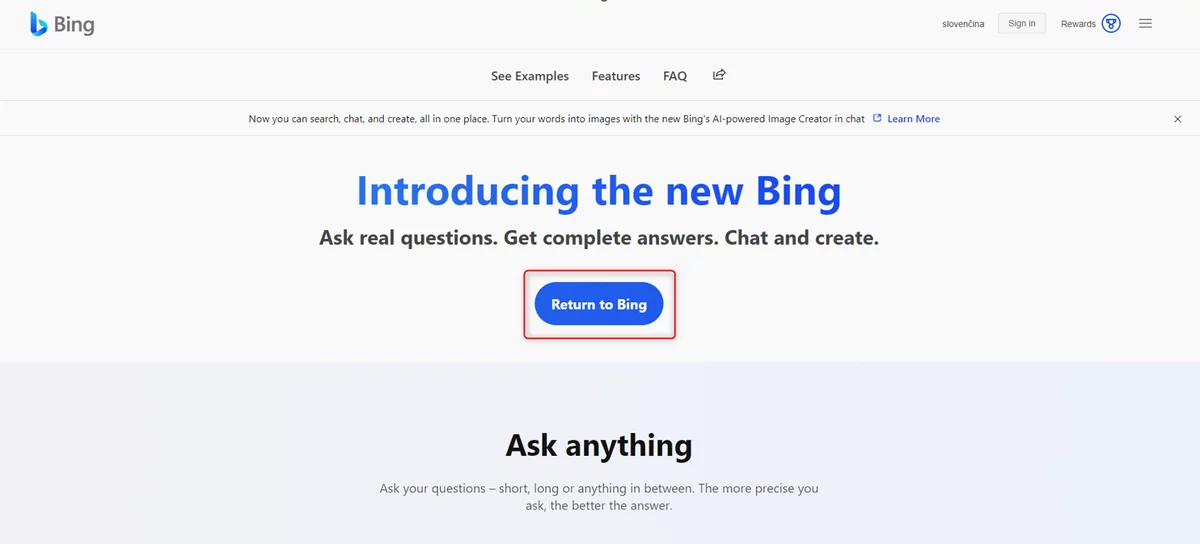
Step 1: Open a new Microsoft Bing page.

Step 2: Click “Return to Bing”.

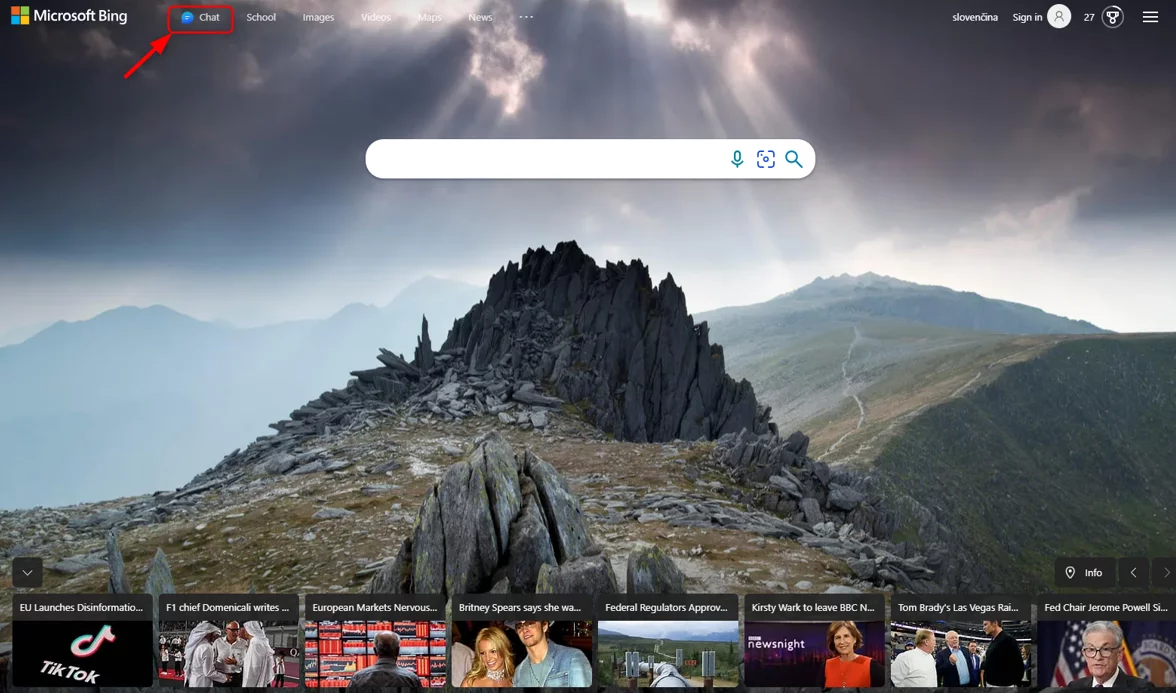
Step 3: Click on the Chat icon.

ms bing screenshot

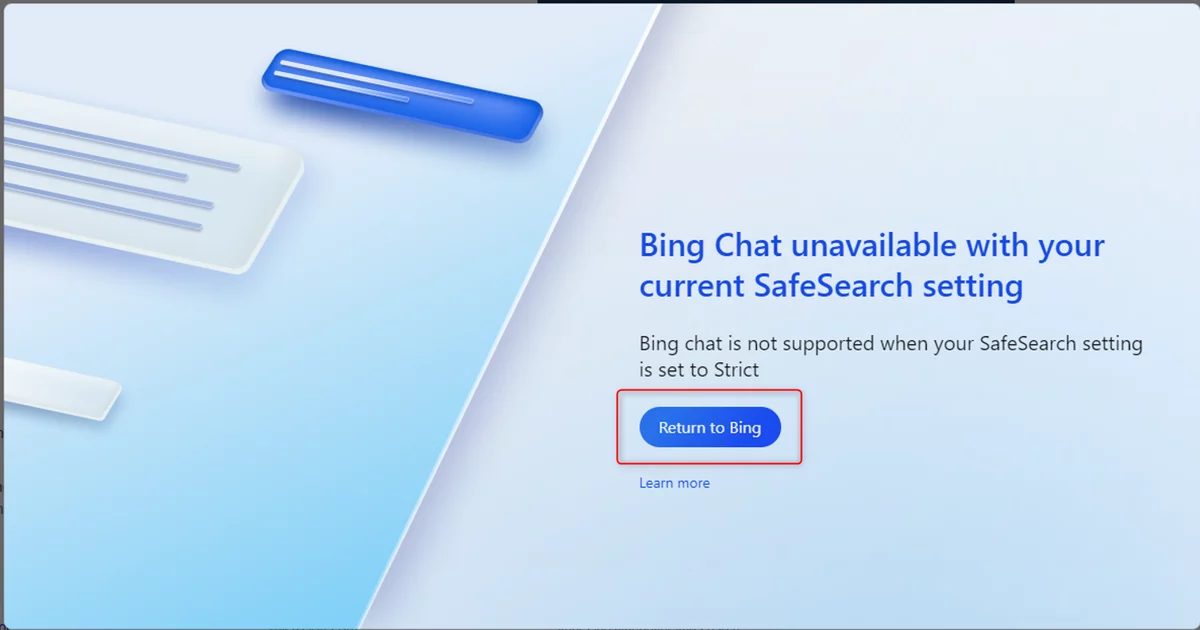
Step 4: You will see the following window. Click on Return to Bing.

ms bing screenshot

Step 5: Now click on the side menu marked in the image and select the “SafeSearch” option.

ms bing screenshot

Step 6: Click “Moderate and Save”.

ms bing screenshot

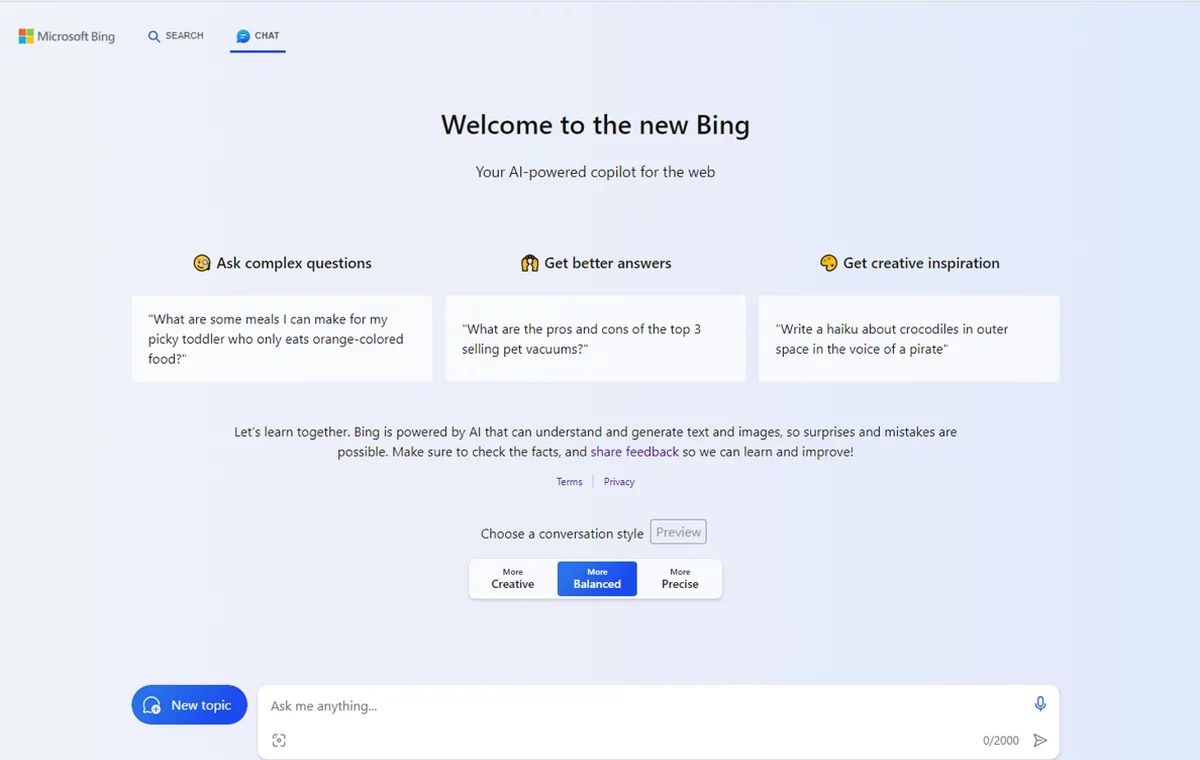
Step 7: This page will open. Now you can ask the browser what you’re interested in.

ms bing screenshot

2. Opera One Browser

The Opera browser has undergone a major modification in both features and design. It now looks just like the Opera One browser released earlier this year and has all its features. However, there is one addition, which is a new chatbot assistant with artificial intelligence called ARIA.

This is Opera’s new native browser assistant that uses the Open AI API. This assistant can read currently open web pages, is completely free and has up-to-date information.

Pros:

  • chatGPT is powered by an AI chatbot called ARIA,
  • free use,
  • up-to-date information,
  • can retrieve context from currently open web pages,
  • it is also available in a mobile version.

Cons:

  • requires you to create an Opera account or log in,
  • website context does not work on all pages.

How to use Opera One AI Browser Search?

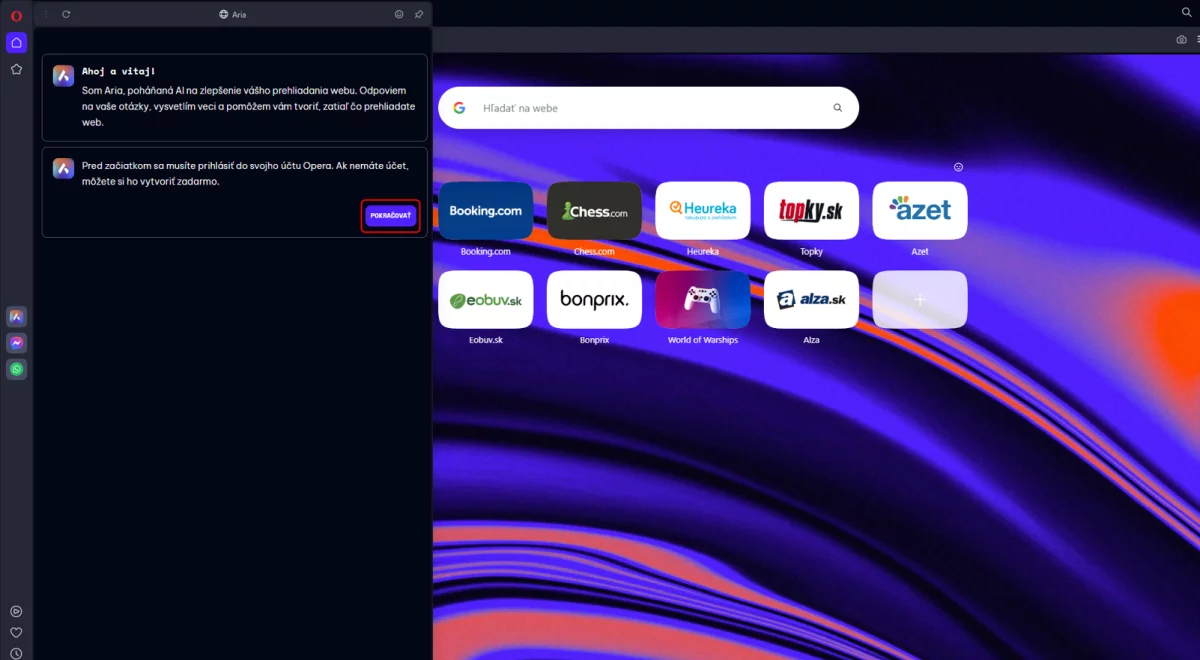
Step 1: Download the Opera One AI Browser by clicking on Download Opera on their official site.

Step 2: Log in to use Aria’s AI tool and go through the initial settings.

Step 3: You should get to this page. Now click on the first icon in the sidebar on the top left:

opera screenshot

Step 4: Click on “Get Started”.

Step 5: You will now see this window. Click “Continue”.

opera screenshot

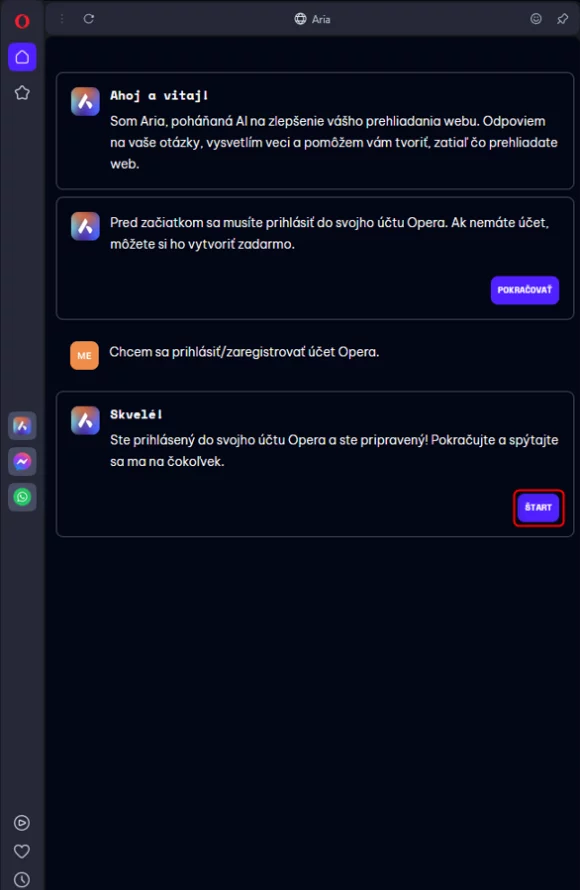
Step 6: If you haven’t signed up yet, do so now. If you are already logged in, click on “Start”.

opera screenshot

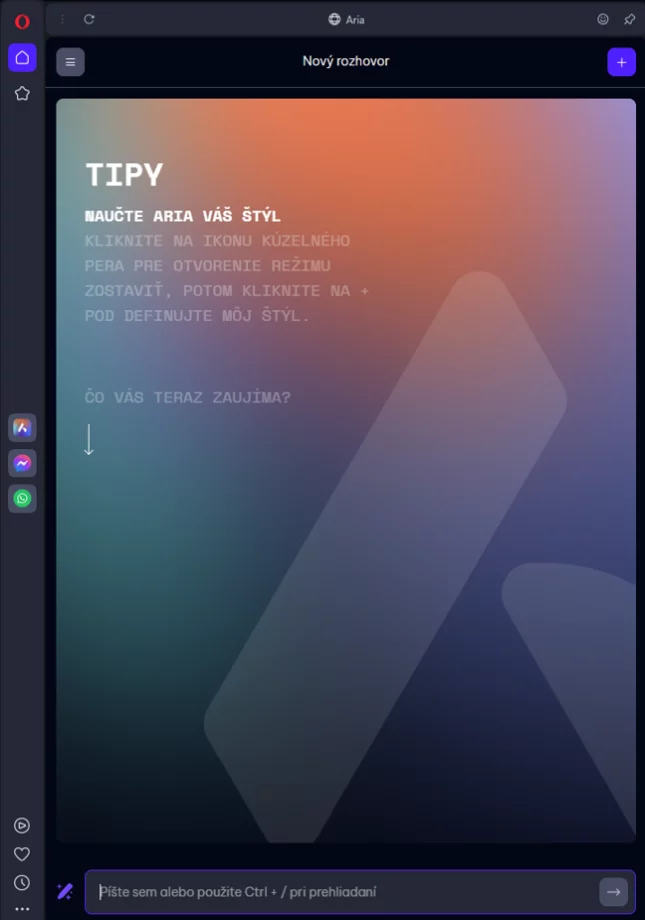
Step 7: You can now enter your question in this row.

opera screenshot

3. Brave Browser

Brave Browser is a free and open source web browser based on Chromium. The browser is known for its privacy and security features such as ad blocking and tracker blocking.

Brave Browser advantages:

  • Block ads and trackers on all websites you visit,
  • allows you to block scripts on the website,
  • allows you to block cookies on the website,
  • Features : private browsing mode, anti-tracking and untracking,
  • based on Chromium, which means it’s fast and powerful,
  • Brave Summarizer provides a clear summary of the results page,
  • provides links to the web pages that are the source for generating the summary.

Cons:

  • does not work with all search queries,
  • needs further feature enhancements.

How to use Brave Browser Summarizer?

Step 1: Install Nightly channel, which is the desktop browser for Brave, otherwise you won’t be able to run Summarizer.

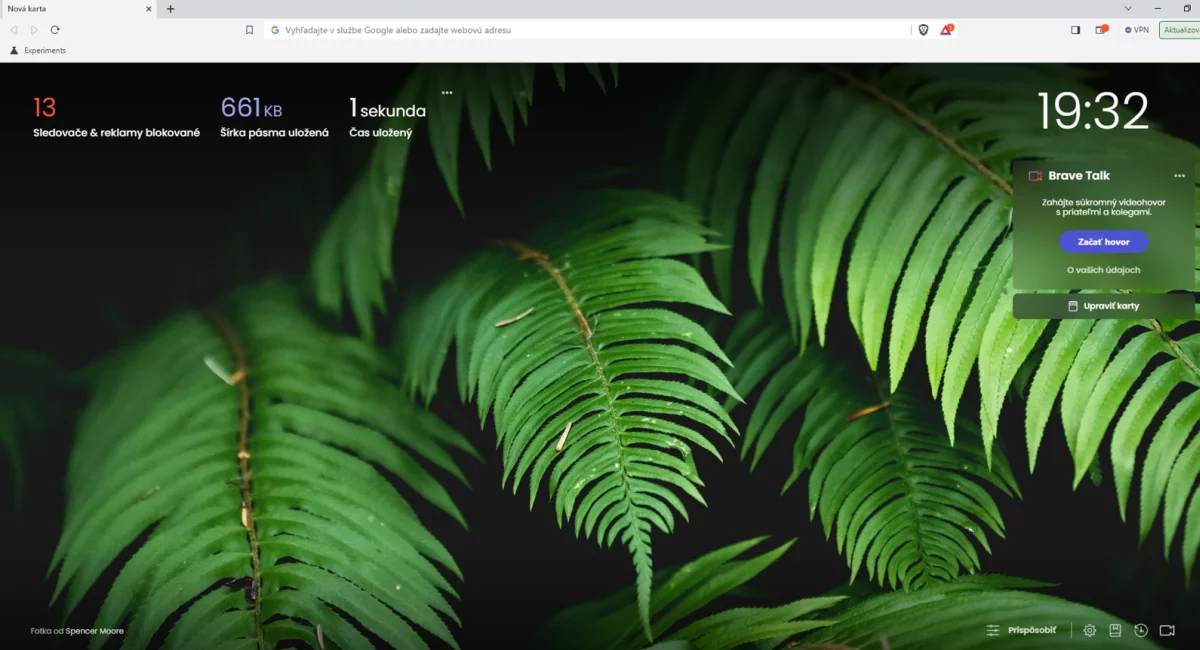
Step 2: Once the installation is complete, open your browser.

brave browser screenshot

Step 3: Type the following in the url bar: brave://flags/#Summarizer

brave browser screenshot

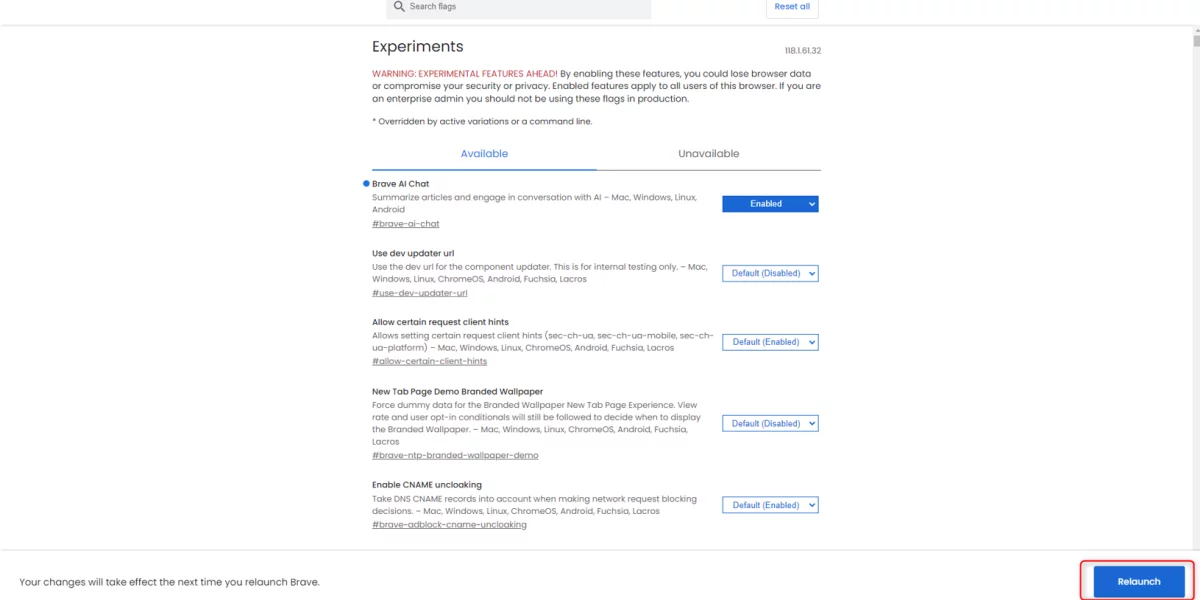
Step 4: Find “Brave AI Chat” and select “Enabled”.

brave browser screenshot

Step 5: Press the “Relaunch” button to reopen the browser with the changes applied.

brave browser screenshot

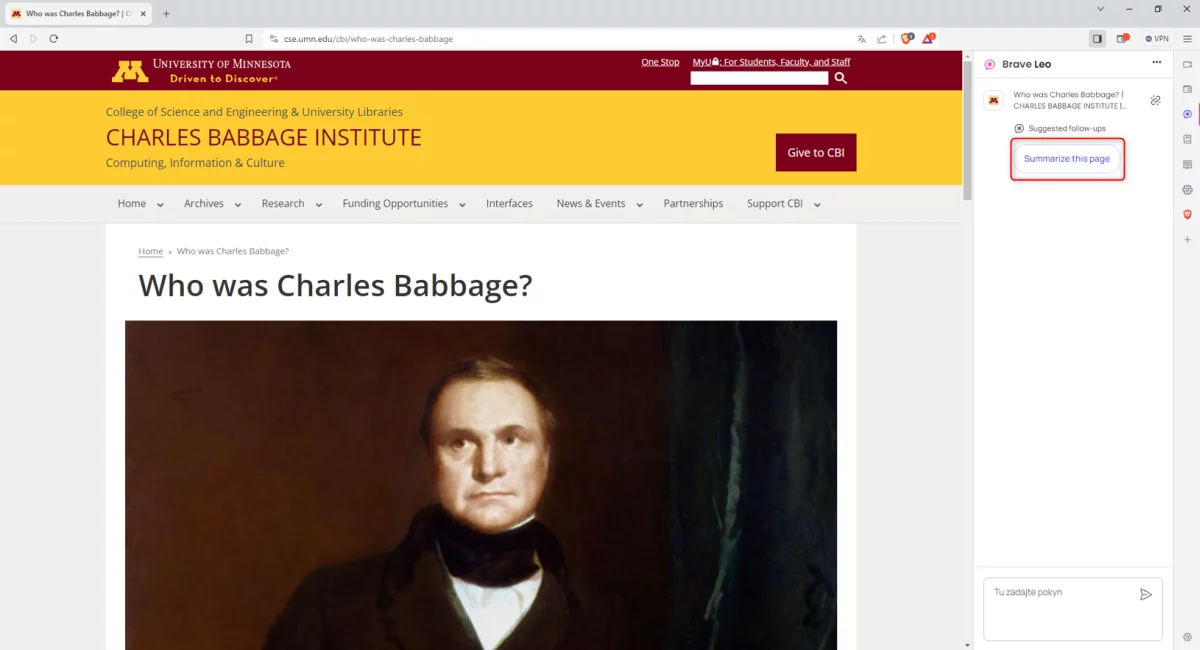
Step 6: Find any page on the Internet from which you want to get a summary of the information.

brave browser screenshot

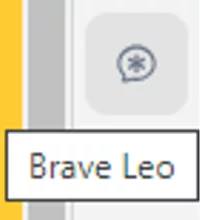
Step 7: Click on this icon in the side menu.

brave browser screenshot

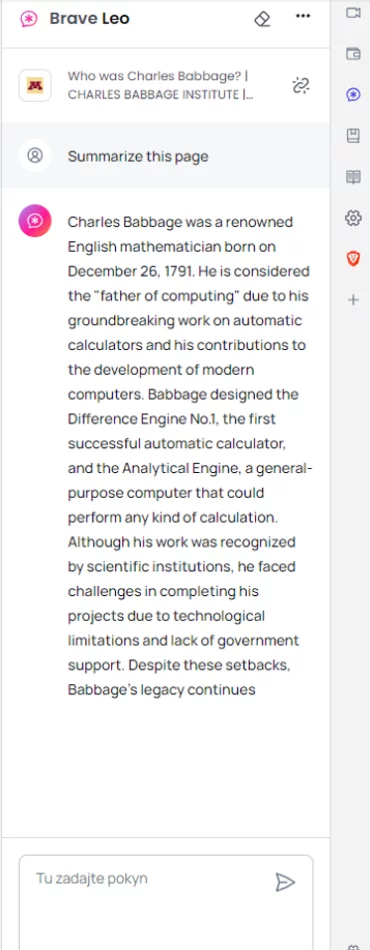
Step 8: : On the right, you’ll see a chat with a button that says “Summarize this page”. Click on the button to view a summary of the contents of this page.

brave browser screenshot

4. Wavebox Browser

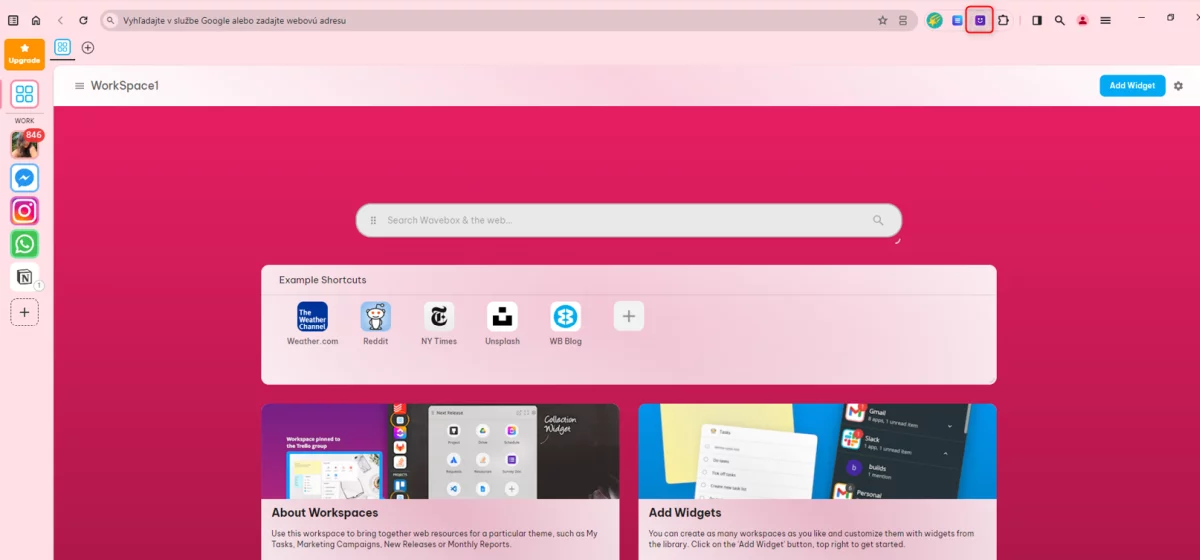
Wavebox is a Chromium-based web browser that aims to increase user productivity and efficiency. The browser offers several unique features that set it apart from other browsers. It has a customisable sidebar that lets you quickly jump between web pages, a focus mode that limits distractions, a split-screen view, a task manager and more. It also includes a ChatGPT AI chatbot called Brainbox, which you can access via the toolbar, Translate, Draft and Reply, and Summarize and Smart Note.

Pros:

  • allows you to choose from different ChatGPT models,
  • revisit and continue previous chats,
  • easily accessible functions via the toolbar,
  • support for custom add-ons in the Pro version.

Cons:

  • Advanced models require an upgrade to the Pro version.

How to use Wavebox Browser search ?

Step 1: Download Wavebox for Windows/Linux/Mac at this link: https://wavebox.io/download

Step 2: Double click on the exe file you downloaded and install the Wavebox browser.

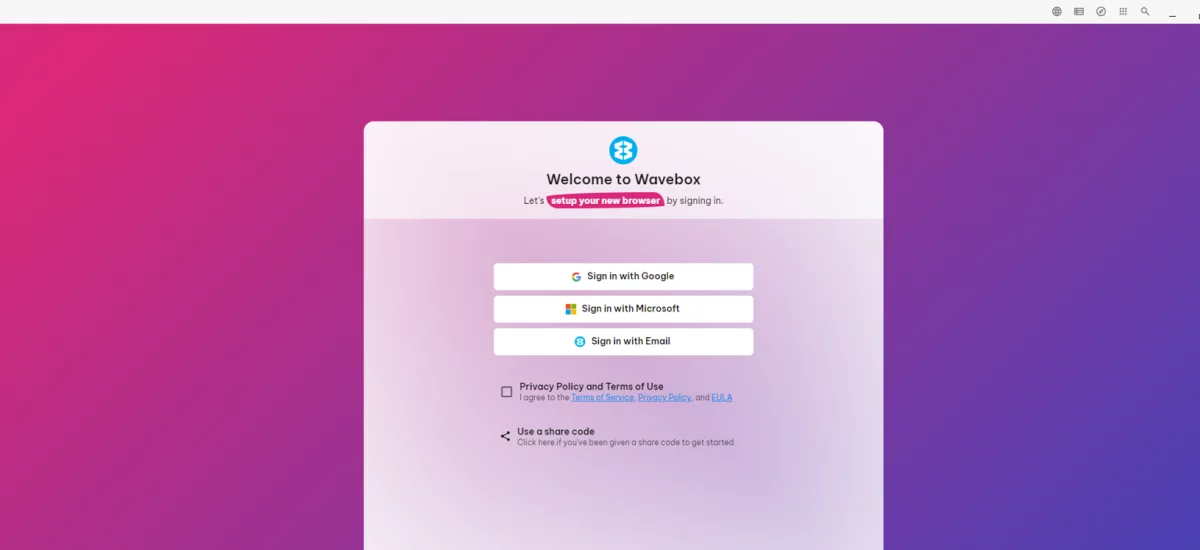
Step 3: When the installation is complete, the Wavebox will start automatically. Now click on the “Privacy Policy and Terms of Use” checkbox. Next, click on one of the three login methods and enter all the necessary details.

wavebox screenshot

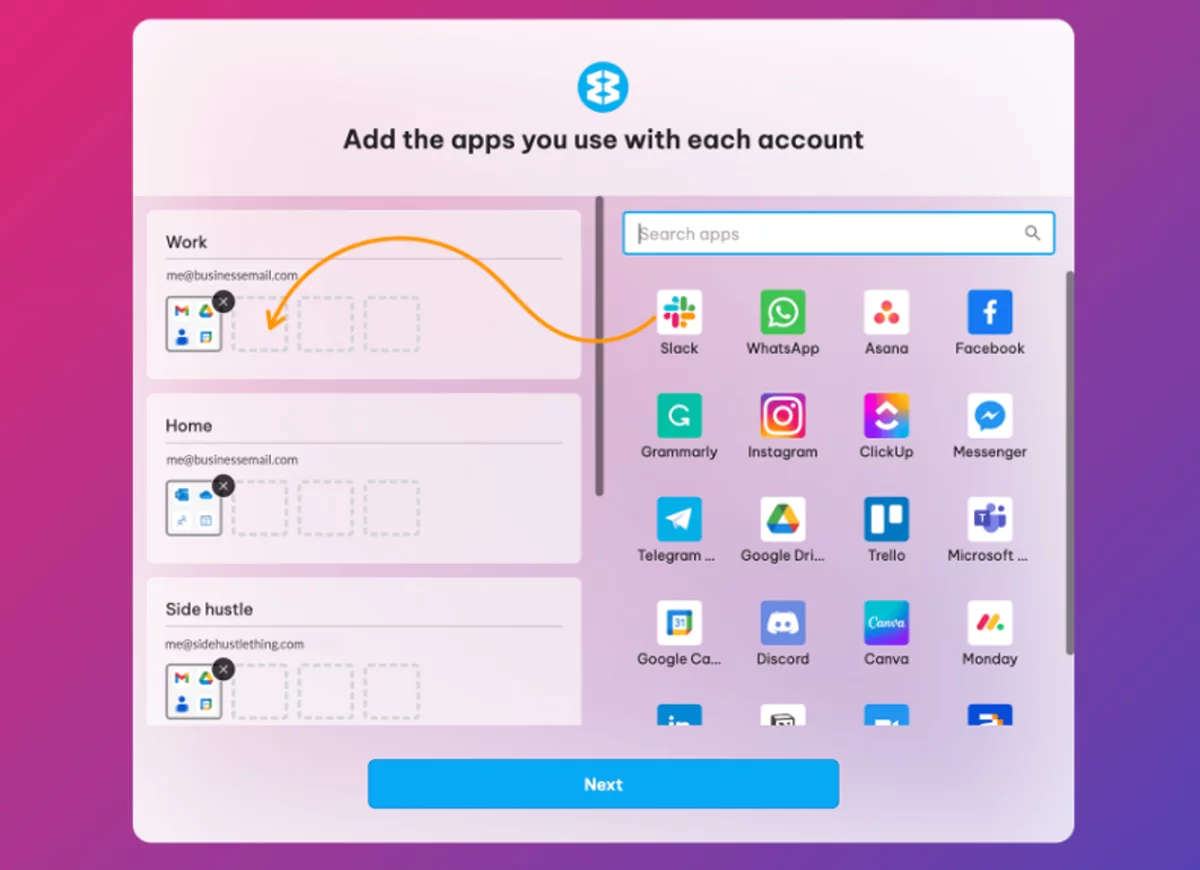
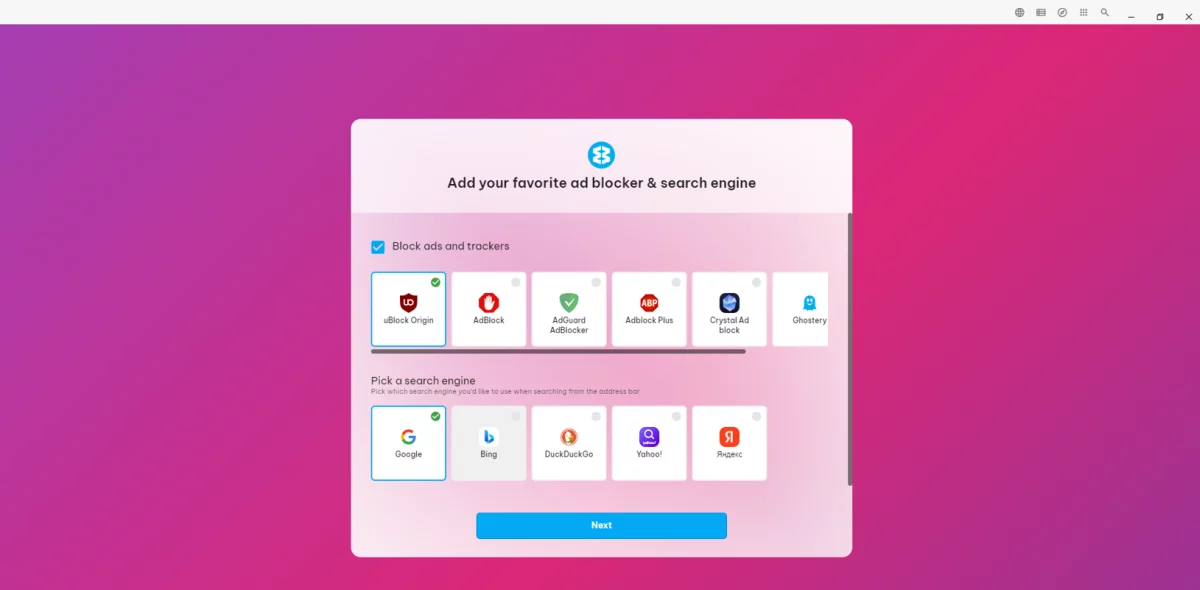
Step 4: In this step, you can choose your favorite apps, which ad blocker you prefer and a search engine.

wavebox screenshot

wavebox screenshot

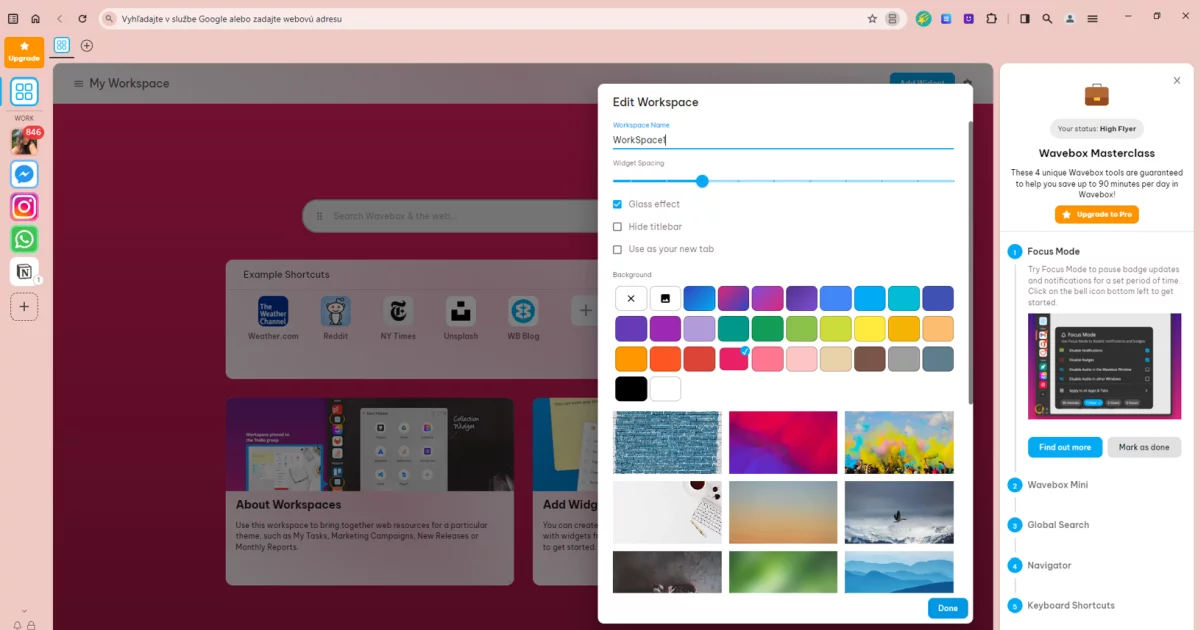
Step 5: Finally, you can choose a colour theme for your browser.

Step 6: Go through the Masterclass tour step by step. We recommend you don’t skip this step, as you’ll learn how to make the most of Wavebox and all the features it has to offer.

wavebox screenshot

Step 7: At the end of the first part of the Masterclass tour, you can create and edit your workspaces.

wavebox screenshot

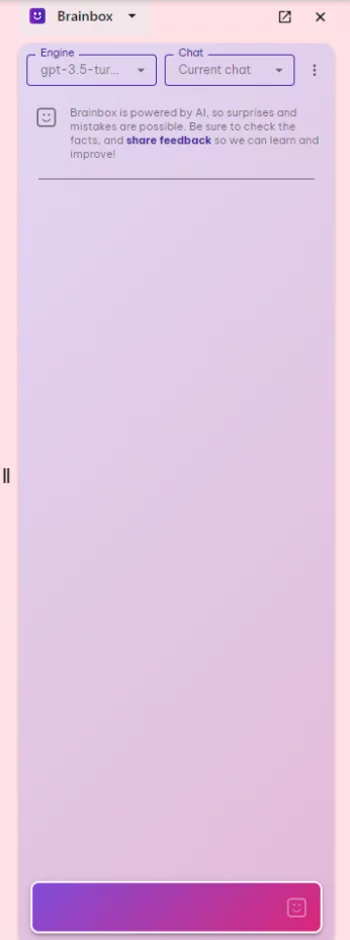
Step 8: Click on the smiley icon located at the top of the bar.

wavebox screenshot

Step 9: Done. You can start writing your questions.

wavebox screenshot

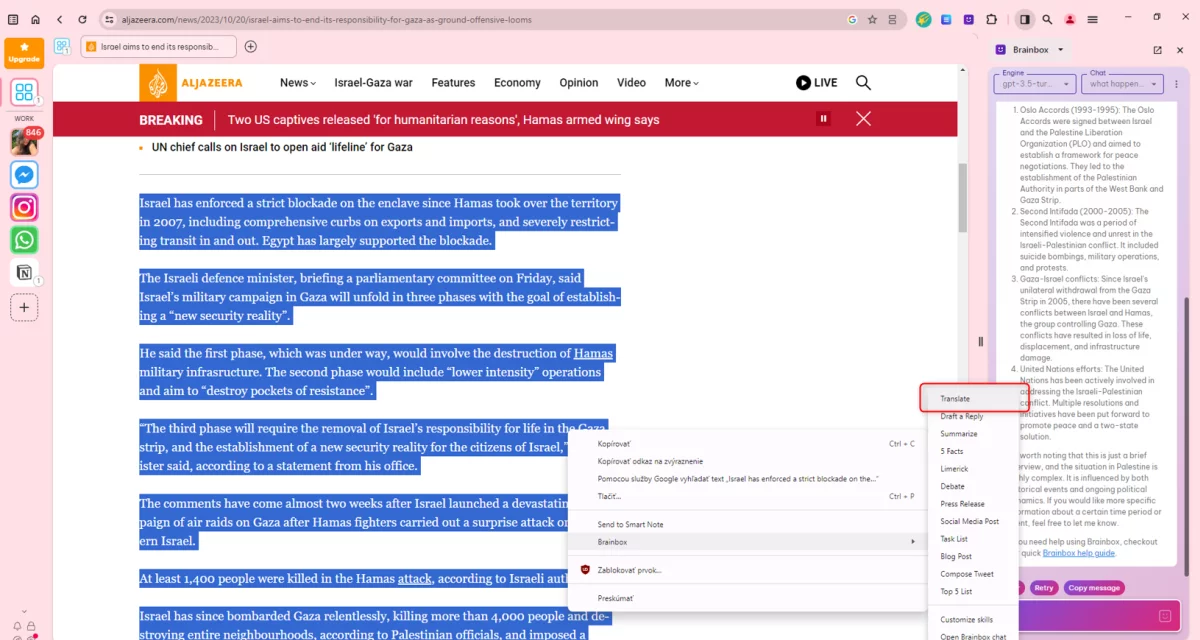
Step 10: Use the built-in functions to translate the text right away. Simply highlight some text, right-click, select “Brainbox” and choose “Translate”.

wavebox screenshot

Next in the chat, the text will be translated immediately.

wavebox screenshot

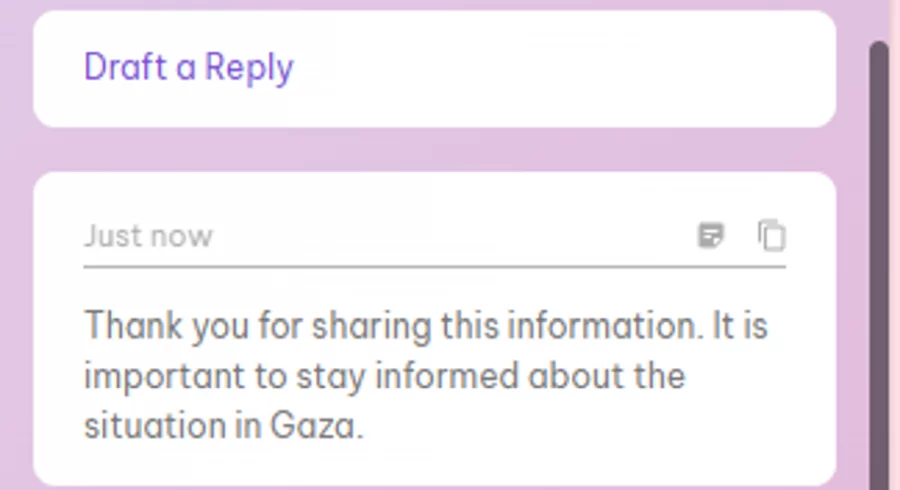
Step 11: If you want to use the “Draft” and “Reply” functions, the process is the same. Highlight the text, right-click, select “Brainbox” and “Draft” and “Reply”. This feature can be used if, for example, someone sends you an article and you want an idea of how to reply because you might not want to read it. Again, you’ll get the answer in the chat on the right.

wavebox screenshot

Step 12: Turn on the “Summarize” function in the same way as the previous two functions. The text summary will be displayed again in the chat.

wavebox screenshot

5. OperaGX with ChatGPT Integration

Opera One isn’t the only web browser with an AI makeover. Similar AI features have been given to the popular Opera GX browser, which is aimed at PC gamers. These include ChatGPT and ChatSonic chatbots on the toolbar.

Opera GX, which is known for its speed and performance, now also offers artificial intelligence (AI) features.

These features are available to existing users and include:

  • ChatGPT and ChatSonic, which allow users to have conversations, learn and create,
  • AI that provides summaries, main ideas, related content, and meme creation of any web page you’re currently viewing.

Pros:

  • engaging chatbot AI integration,
  • quick summary of web pages using the AI prompt tool,
  • try out GPT-4 for free with ChatSonic.

Cons:

  • AI prompt tool does not work on some websites.

How to use Opera GX search with ChatGPT integration?

You work with this browser in the same way as described in the instructions for Opera One AI Browser.

6. SigmaOS Browser

SigmaOS is a browser based on Chromium and offers advanced tab control. The browser is equipped with a decent set of features to help maximize workflow, along with a nice interface. It is designed to suit those who want to get the most out of their browsing. One of the major additions is an artificial intelligence companion called Airis.

Airis in SigmaOS works similarly to ARIA in Opera. It can provide context based on the currently open web page. Airis may also create content summaries, edit or overwrite available or provided content. It is currently still in its early version.

Pros:

  • control of the cards,
  • a companion with AI called Airis,
  • sophisticated and elegant design language,
  • a focus mode that prevents distractions,
  • copy a link to a page with one click.

Cons:

  • Airis is only available for macOS users.

7. DuckDuck Go

DuckDuck Go is a new browser from DuckDuck Go that uses artificial intelligence to improve the user experience. The browser is still under development, but already offers some interesting features.

Pros:

  • DuckAssist AI assistant,
  • the browser uses artificial intelligence to personalize the content you see. This includes showing you more relevant search results, recommending articles that might be of interest to you, and showing you ads that are relevant to your interests,
  • the browser uses artificial intelligence to simplify use, this includes automatically filling in forms, designing web pages and providing help with troubleshooting,
  • the browser uses artificial intelligence to improve performance, this includes predicting which websites you’re likely to visit next and pre-loading them in the background.

Cons:

  • the browser is still under development, so it may contain bugs or limitations, currently it only provides results from Wikipedia sources,
  • the browser is only available for computing devices and only for Windows for now.

How to use DuckDuckGo search ?

Step 1: Download the DuckDuck Go browser from this page.

Step 2: Open the file to install.

Step 3: Select the “Install” option.

duckduckgo browser screenshot

Step 4: When you’re done with the installation process, the browser will open by itself. Click on “Get Started” and go through the whole process.

duckduckgo browser screenshot
Step 5: Now you can search for what interests you! However, if you want to try DuckAssist assistant, go to a browser where it is available, e.g. Firefox, Chrome.

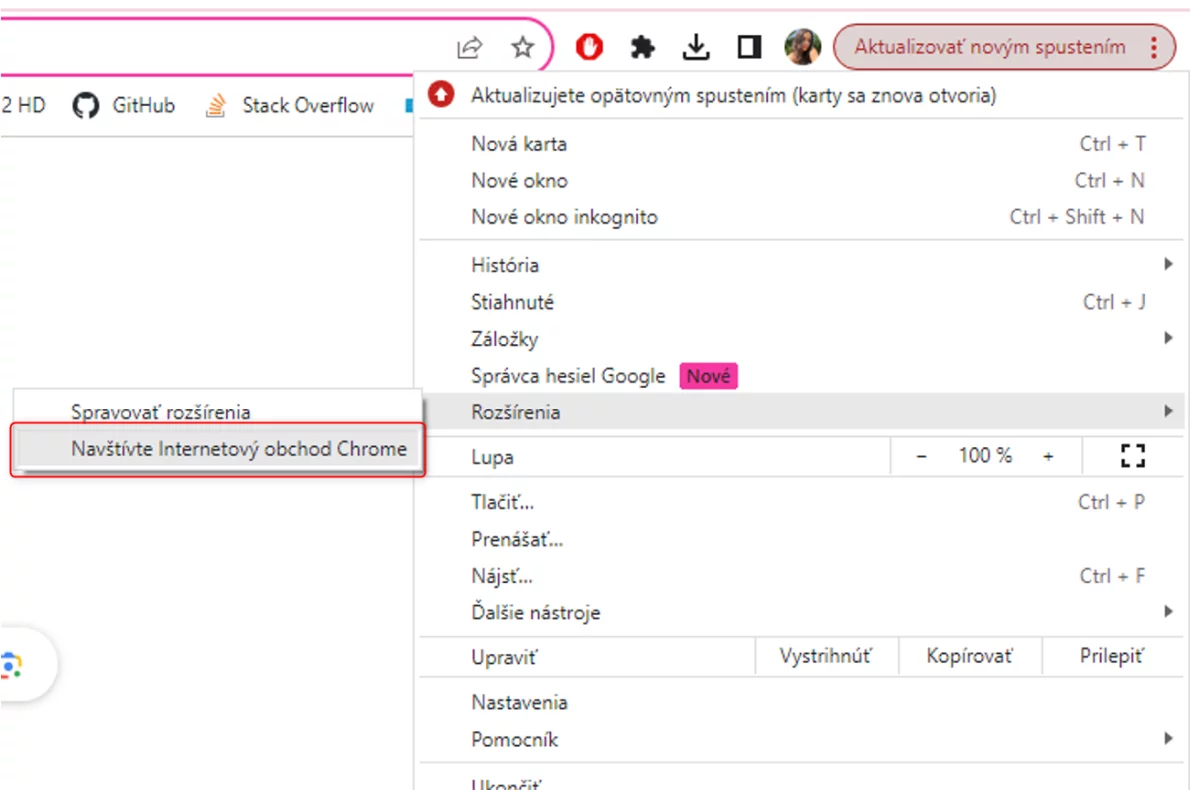
Step 6: Click on the three vertical dots in your browser, then choose “Extensions” from the menu and click “Visit Chrome Web Store”.

duckduckgo browser screenshot

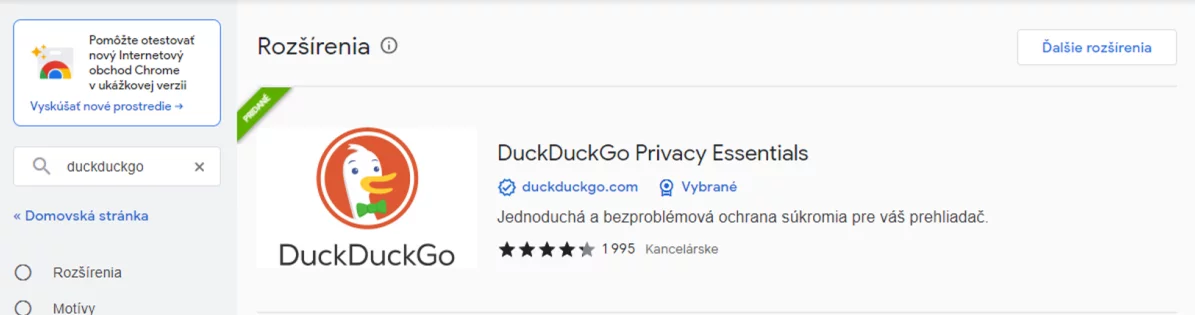
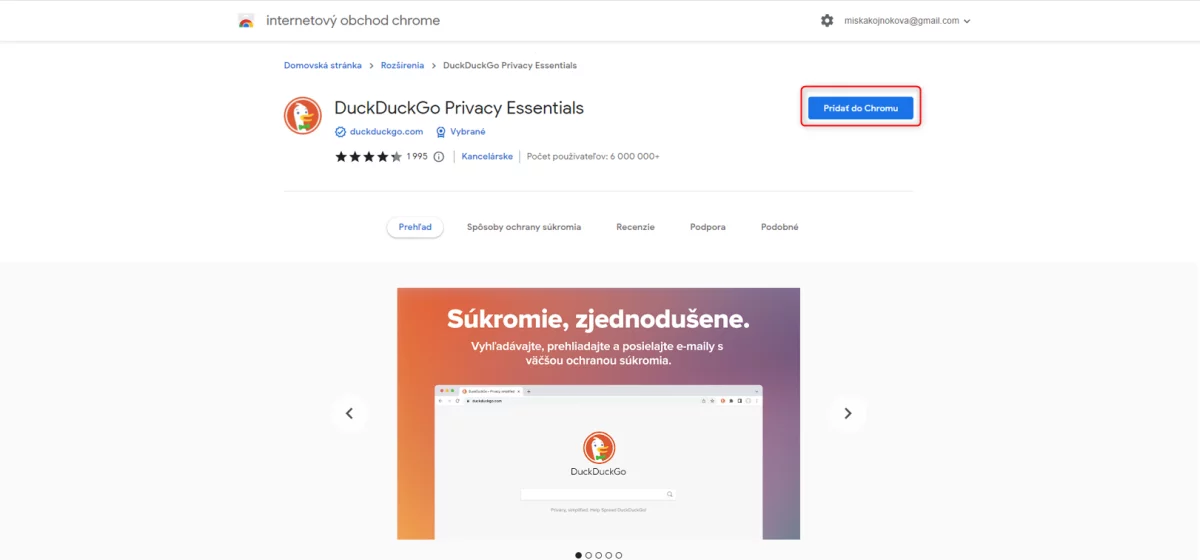
Step 7: Type “duckduckgo” in the search box and click Add to Chrome to install the extension.

duckduckgo browser screenshot

duckduckgo browser screenshot

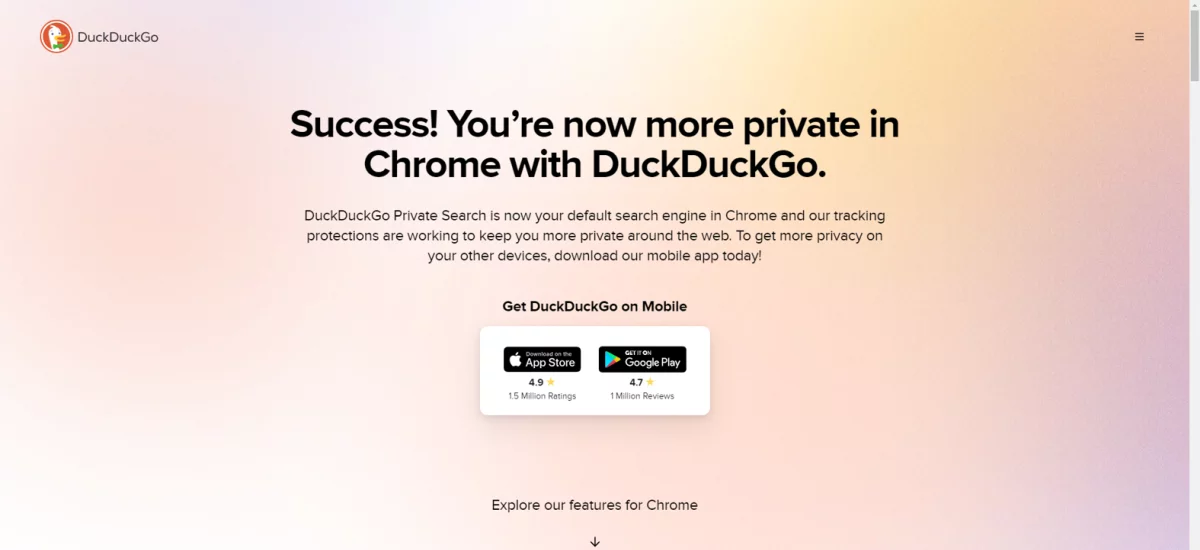
Step 8: You should see this screen now.

duckduckgo browser screenshot

Step 9: You can now enter your question in the search box, but you are less likely to get an answer from the DuckAssist assistant, because for now, providing answers only works for queries that are in Wikipedia. Even that’s if you’re lucky. We tested a range of the most common questions guaranteed to find answers in Wikipedia, but DuckAssist didn’t show answers once.

8. Vivaldi

Vivaldi is a web browser that focuses on customization and performance. The browser offers a number of features that differentiate it from other browsers, such as integration with multiple applications and services, allowing users to access them directly from the browser. Supported apps and services include Slack, Twitter, Gmail, Google Calendar, Asana, Trello and more.

Vivaldi offers users the ability to customize the look and features of the browser. Customization options include themes, extensions, and shortcuts. It also offers a Workspaces feature that allows users to organize their open tabs and applications. There’s also a Focus mode feature that blocks out distractions and allows users to focus on their work. Focus mode darkens the background and turns off notifications.

Pros:

  • offers users a wide range of customization options, allowing them to create a browser that suits their needs,
  • Vivaldi is known for its performance and ability to launch websites quickly and smoothly,
  • offers integration with multiple apps and services, making it easier for users to multitask,
  • offers Translate – Vivaldi Translate is a built-in translation tool that uses artificial intelligence to translate web pages into different languages, supports more than 100 languages and is available for both desktop and mobile devices,
  • Image Viewer – Image Viewer Vivaldi is a built-in image viewer that uses artificial intelligence to identify objects in images and provide information about them, for example, if you view a picture of a cat, the Vivaldi image viewer can identify it as a cat and provide you with information about cats, such as their diet, environment and behaviour,
  • Vivaldi Mail – Vivaldi Mail is a built-in email client that uses artificial intelligence to filter spam and phishing emails, it also has a “Smart Reply” feature that suggests short, relevant replies to emails,
  • they continue to work on developing additional AI features.

Cons:

  • may be too complex for some users,
  • is not as popular as Chrome or Firefox.

How to use Vivaldi search?

Step 1: Download the Vivaldi browser from this page.

Step 2: Run the installation file and go through the installation.

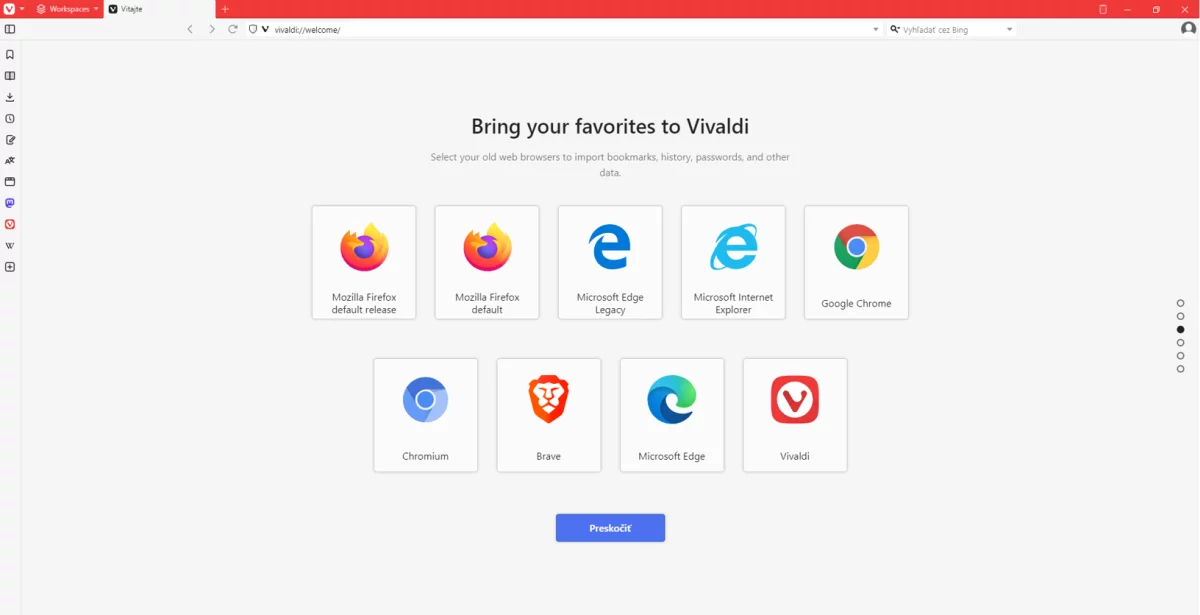
Step 3: Set up ad tracking and choose which browser you want to transfer your old data from.

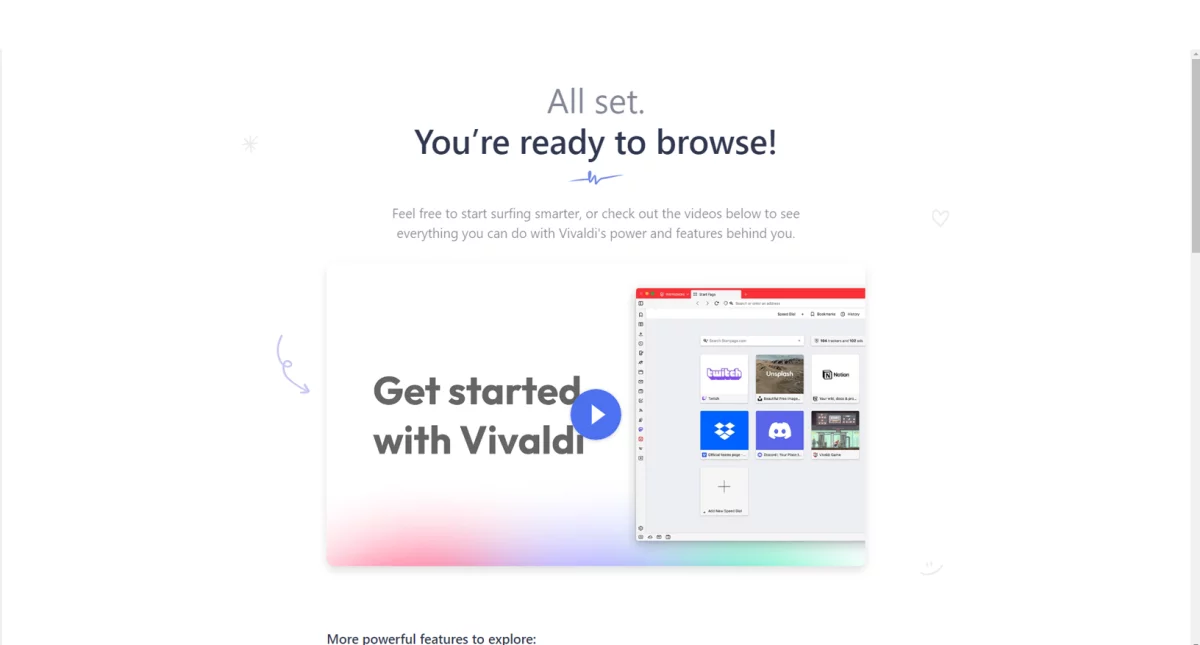
vivaldi browser screenshot

vivaldi browser screenshot

Step 4: Now the browser is ready.

vivaldi browser screenshot

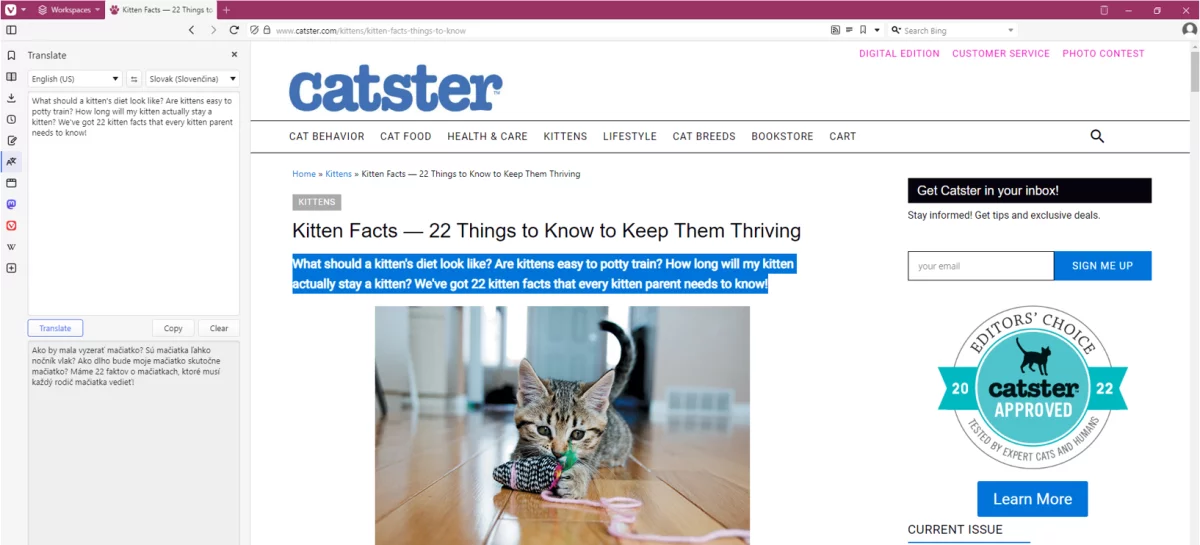
Step 5: If you want to try the Translate function, for example, go to a page and press the following button in the sidebar.

vivaldi browser screenshot

Step 6: Then check the Auto-translate selected text checkbox.

vivaldi browser screenshot

Step 7: Now you can select any text and get an automatic translation into the language of your choice.

vivaldi browser screenshot

Conclusion

First place goes to Wavebox Browser. You can customize just anything you can think of in this browser. You can choose which ad blocker or search engine you prefer. You can choose from a big number of colour schemes. You can also choose your favourite apps and create Workspaces for different parts of your life, such as Work, Home, Learning, Side Hustle, etc.

It also offers a Brainbox chatbot where you can choose the ChatGPT version, a Translate function that reliably translates what you need, a Draft and Reply function that outlines a possible reply to an email, a Summarize function that summarizes the content of the page, and a Smart Note. (Use the Masterclass to familiarize you with all the features.)

The second place goes to Brave Browser with its Summarizer function, which really well summarizes the content of the page without leaving out anything essential. Very usable and for people with little time even desirable. Microsoft Edge also offers a cool feature in the form of the well-known Bing chat.

What we didn’t like, on the other hand, was that we couldn’t access the DuckAssist assistant for the DuckDuckGo browser. We tried for an hour with no result. This assistant supposedly only appears if it finds its answer in Wikipedia, but it didn’t appear even when we typed in exactly what we found in the Wikipedia article.

The msg life Slovakia team was the first to successfully implement a cloud solution for a customer

Moving from a standard deployment to a cloud solution is a hot topic for many large companies. These include one of the largest Swiss insurance companies, which has been a long-standing customer of msg life. However, since the beginning of 2023, there have been significant changes in personnel and technology in this project. For the first time the care of the client was taken over by the msg life Slovakia team headed by Michaela. During the summer, they successfully migrated from version 21.4 to 22.3 and were the first in our company to introduce the cloud to a customer.

“The project was in a stable phase, so the German management decided to leave much of its management and development to us. The employees of msg life Slovakia are usually assigned to German teams, but this time it is different. The German colleagues were replaced by Slovak colleagues at the beginning of 2023, with the German staff only having a support function,” says Michaela, the project leader about the personnel changes.

She didn’t get the management post by chance, as she knows this project very well since its beginnings: “I worked on the project fifteen years ago, where I started as a tester. I assisted with migration, testing and deployment of CorLife into production, from which the customer later transitioned to msg.Life Factory.” Michaela participated in other projects for the next few years, where she gained, among other things, managerial experience, which she is using in this project as well.

Agility as the key to progress

“After the transition from CorLife to msg.Life Factory the project has moved from a classical development and management approach to an agile one. I was initially sceptical about agile development management when I started to work again on the project. Now I see that, unlike the standard model, it helps the project dynamics a lot. This was also reflected in the staffing structure. Hierarchical differences have been removed and relationships have become more consolidated. Everyone in the team is equal, so everyone takes responsibility and actively contributes to the progress. This not only advances the project, but also every colleague in their career,” says Michaela.

Besides her, Product Owner Michal and Scrum Master Peter are also new to the project.. “Michal’s role is mainly communication with the customer, he needs to understand the requirements well, communicate them to the team and be informed about the product updates. Peter’s role is primarily to coordinate the team, ensure its efficient functioning, the satisfaction of colleagues and adherence to agile principles,” explains Michaela.

The entire team consists of approximately 14 members. “It is often shown how irreplaceable programmers or testers are. I especially appreciate their willingness and commitment to go above and beyond at times. It is great that we have colleagues in the team who can be relied on in a critical situation. In addition, we often have support from staff from other projects who also help us address the cloud migration challenges,” adds Michaela. The cloud is another significant change in the project.

Successful introduction of cloud

Although Michaela’s team is working in a stable project, one of the biggest challenges came already in the summer.. “Not only were we rolling out multiple changes at once, skipping several versions, we were also moving to the cloud. In the context of large insurance companies, the cloud is still in its infancy and most of the time, the clients themselves handle such a transition. So it was a total novelty in our company. We had to deal with various challenges such as proper system configurations, configuration of build images in the cloud or the temporary inability to fully test the system in our cloud,” adds Michaela.

And it seems that although the project has been full of challenges, it has already reaped its first successes. “Switching to version 22.3 has delivered a result beyond expectations. Despite the relatively short testing period and major changes, the new version with the cloud was deployed without major complications. We not only proved to the customer that we are a suitable partner, but also to our German colleagues that we can overcome the challenges this project brings,” she says. In addition to the chemistry and motivation of our colleagues, regular customer workshops with our team, which take place in Switzerland and Bratislava, also help to achieve this. Their topic is further mutual cooperation, testing efficiency, continuous delivery as well as improving the quality of the solutions offered.

“Moreover, this is a very unique customer. Not only have we known each other for many years, but they are also very helpful and cooperative. This also allows us to apply agile ways of development and management,” she adds. According to Michaela, the project is currently stabilized and its expansion is not planned yet. Following the recent successful implementation of customer requirements, further tasks are being progressed. Soon, the insurance company will be celebrating its round anniversary, which may also bring more interesting topics for our company.

How to find your dream job? Read these job hunting tips to make your job search easier

The job search is a complex and not always straightforward process. Some employers won’t get back to you, others require several years of work experience. Here are some universal tips to help you speed up and simplify your job search.

Find out what you really want to do

Everyone is good at something. If you don’t know what your “something” is, you have to find out first. The best solution is to look at what you enjoy for a start. What do you like to do in your free time? Nowadays you can make a living from almost anything. You just need to be fulfilled by it and be really good at it. So try not to jump from one area to another. Pick one and get better at it.

Do you enjoy working on the computer? Try something at home, or find a company that accepts juniors or provides internships for students. At msg life Slovakia we also accept beginners and help them to improve through courses. When you do what you enjoy, everything goes much easier. Not only the actual doing of the work, but also learning new things. It makes the whole process more fun and natural.

Recommend
We recommend:

If you’re not sure what to do in your free time, there’s one solution. You can find personality tests online, some of which are career-oriented. Take one or two. They’ll show you your strengths and what to focus on.

Develop work experience on your CV

Stagnation is unacceptable in any area. There is no one who knows everything and has nothing new to learn. If you think you know every piece of information within your field, you’re making a mistake somewhere. Employers want people who are able to continuously learn and develop their skills. They also value people with both theoretical and practical knowledge in several fields. The more you know, the better.

This internet age allows you to learn from anywhere and often for free. Find interesting articles, research or books. Listen to podcasts and take courses, which are often free or for a very small fee. If you know English, try Udemy or Coursera. We have summarized the programming courses in the article Programming Tips for Beginners. If you don’t have IT experience but want to work in IT, check it out.

English and languages in general are very important when looking for a job. Many employers will require you to have some language skills. Usually B1 is sufficient (in msg life Slovakia we are interested in German language level in a CV), but sometimes B2 or even C1 is needed. When you know you have gaps in your vocabulary or grammar, try to improve it. Download free apps to learn a foreign language or get books. If you want results in a few weeks, choose tutoring.

At msg life Slovakia, we strive to ensure that our employees do not become stagnant. That’s why we offer you English and German language courses (check out Why learn the German language article) among other employee benefits. Developing job skills and abilities on a resume is desirable. The advantage is that further education is not at all demanding. You have unlimited resources at your disposal, so why not use them?

Keep up to date with new trends in the labour market

This point is closely associated with continuous learning and skill development. Some areas are moving forward faster, others more slowly. No matter what field you belong to, keep up to date with all the news. Have any new devices or software started to be used in companies? Find out what they are and what you will need to understand them.

New trends sometimes require studying information from books and proven sources. Other times they require retraining, which you should do before looking for a new job. Otherwise, employers won’t be interested in you.

You have to do something to get new information in the field – it won’t come to you on its own. There are many options. Sometimes you just need to follow the general events. If you need more, start reading websites focused on your field of work. A third alternative is to follow some social media profiles that give you brief but important information.

Tell the world you’re a jobseeker

If your field of work allows it, manage your advert by placing it on multiple websites. Some are free, others cost a few euros a month. However, they are worth investing in because they show employers that you are currently looking for a job.

You can also post your job search ad on Facebook and in various groups. Many areas and types of employment have groups where you can find your potential employer. LinkedIn is also a great professional social network where you can edit your profile so that anyone who visits knows you’re open to new opportunities. So take advantage of the opportunity to search for a job online.

Use practical tips to make your job search easier
You can find plenty of job ads on the internet.

Visit job fairs

In Slovakia, several job fairs are regularly held, either focused on specific sectors or general. Your field may also be represented. In addition to job vacancies, you can find out how to find a job and what companies require from their employees. Job fairs give you the opportunity to explore individual companies and see how they work.

You will learn a lot of interesting information, often information that you wouldn’t find on the internet. Some organizations even do interviews at job fairs. But it doesn’t have to be just recruitment fairs. If you are interested in working for a company, you can also meet its employees at the exhibition. We at msg life Slovakia are very fond of such fairs. We regularly participate in Profesia Days.

Show interest in working for a specific company

Haven’t found an advert that interests you? Choose a specific company in your area and contact them. Some have forms for interested parties. If you cannot find them, it doesn’t matter. It doesn’t mean you can’t show that you are interested. Email the organization or contact them by phone.

However, the first option is better in some ways because you can add a CV and cover letter to the email. In addition, you can be sure that you will be communicating with a competent person. Usually it’s a recruiter or someone who is in charge of hiring people.

Finding a job on the internet

The job market is wide nowadays and thanks to digitalization, you can also search for a job via the internet The best solution is a website oriented towards providing job offers. They often give you the option of subscribing to a newsletter, which the job seeker can customize to their exact liking and requirements.

Many of these websites have social networks like Instagram or Facebook as well. They post the latest job offers on their profiles. So sometimes it’s worth watching them there as well. You can also find jobs on employers’ official websites, so if you want to have your dream job, keep an eye on this site regularly. You’ll find out if they’re looking for someone with your work experience, skills and focus.

Start following employers in your field on social media. Some are putting new job offers there as well. There is also an option to follow hashtags on Instagram. Maybe this will help you in some way. Put some of your energy into your job search and browse the web regularly. Type different keywords into the search engine, such as “work + your job” or “career + job”.

Recommend
We recommend:

Some employers have a specific application form for prospective candidates. You can complete and submit this form even if the company is not currently recruiting. It will then be stored in a database, and you may be contacted by a recruiter if a suitable vacancy arises.

How to find a job on LinkedIn

You can also find or get a job offer on LinkedIn. It is a professional network designed for professional networking – LinkedIn jobs and networking. You’ll find a section with job vacancies. How to do it? Create a LinkedIn profile, you can also put your CV on LinkedIn platorm and search for people in your field. We have covered the topic of How to find job on LinkedIn in another article.

If you’re looking for new clients as a freelancer, coworking spaces are also an option. These are places where people like you work. So you can connect with people in the same field who can help you more than you would think.

Although the network is not yet as widespread here as abroad, more and more companies are starting to use it. There are many ways to find a job, so you never know where the best and most interesting job offer will appear. So read more about why be online on LinkedIn platform.

Work with us
New jobs can also be found online

Finding a job doesn’t have to be difficult

Looking for a new job can seem exhausting and lengthy at first. But the truth is that there are now countless ways to simplify the process. Find web portals with job offers. One of them is msg life Slovakia, which is constantly looking for new employees. Expand your reach and don’t forget to have realistic expectations. Stop by for our handy tips, check out our latest job offers and kick-start your career!