

Keyboard shortcuts: 60+ of the most used keyboard shortcuts for Windows and Mac to make your job easier

Want to make your life a lot easier? Use keyboard shortcuts! They’re practical and you’re guaranteed to use them when you’re working on your computer. There are times when it’s easier to click a few keys on a keyboard than to move the mouse. Here’s a selection of shortcuts that are perfect for everyday PC work and will save you time. Which ones do you know?

1. Close the window/tab in the operating system or browser

Windows: Ctrl+W,

Mac: ⌘Cmd+W

A handy keyboard shortcut closes the currently open window, not the entire program. This means that if you have different documents or pages open on the Internet, only the one you use this “command” on will close.

2. To reopen a recently closed tab in the browser

Windows: Ctrl+⇧Shift+T,

Mac: ⌘Cmd+⇧Shift+T

I’m sure this has happened to you a few times. You accidentally closed the card you needed to have open. Very annoying, isn’t it? Don’t worry, though. Browsers have a great feature that lets you find the last tab you closed and easily reopen it.

A handy keyboard shortcut does it for you. If you have closed more than one tab, continue clicking the T key to open all tabs in the order you closed them.

3. Switch between tabs in the browser

Windows: Ctrl+PageUp/PageDown,

Mac: ⌘Cmd+Opt+←/→ (Firefox and Chrome); ⌘Cmd+Shift+←/→ (Safari)

You can use the Tab key instead of the PageUp and PageDown keys for this purpose, but the last 2 keys will allow you to cycle in either direction. PageUp takes you to the tabs on the left and PageDown takes you to the tabs on the right.

4. Minimize/maximize window

Windows: Alt+Space+N (minimize)/Alt+Space+X (maximize),

Mac: ⌘Cmd+M/⌘Cmd+L

There are several shortcuts to minimize and maximize windows. In this case, these are the most basic keyboard shortcuts, which are also the most used.

Recommend
We recommend:

We’ll also mention the Windows+D shortcut. You use it when you’re working in a web browser and have, say, Notepad open next to it. You can also write a Word document and listen to music in a music player at the same time, with all the above windows open. If you need to get to a particular icon or file on your desktop, you don’t have to minimize each window separately. Just use this shortcut to go straight to the desktop. At the same time, each open window is minimized to the taskbar.

5. Minimize/maximize everything

Windows: Win+M,

Mac: ⌘Cmd+Alt+M

Want to quickly switch to a clean desktop with no open programs? Use this shortcut to return all open programs to the taskbar.

6. Browse all open apps

Windows: Win+Tab,

Mac: ⌘Cmd+Tab

Hold down the Windows key or Command key and click the Tab key to scroll through all open programs.

7. New window

Windows: Ctrl+N,

Mac: ⌘Cmd+N

If you are using a browser, a new window will open. If you are using word processing software or Photoshop, a new document will be created. Alternatively, it will open the same folder in your file browser.

8. Rename the file

Windows: F2,

Mac: Enter

Use this keyboard shortcut to easily rename the file or folder you are working with in file explorer.

9. Find

Windows: Ctrl+F,

Mac: ⌘Cmd+F

A keyboard shortcut that allows you to find the specific word you want to search for in a document or in the browser . Type an expression in the search field that opens and press ENTER. Press ENTER again to scroll through all occurrences of the word in the browser or document.

Did you know that…

…the shortest space bar on a keyboard is found in Japan? In this country, the space bar is much shorter than on any other keyboard. Why is that? The reason is simple. All Japanese keyboards require switching between Latin/Roman letters (called rōmaji) and Japanese characters (called hiragana and kana).

10. Find and Replace

Windows: Ctrl+H,

Mac: ⌘Cmd+Shift+F

A handy keyboard shortcut is used to replace a word in a text document with another word. If you want to edit the text and replace a word, phrase or sentence, enter a keyword in the search box and replace it with another.

If a web browser is open, clicking on this shortcut will display a history of the pages you have viewed on the site.

11. Scroll to the beginning or to the end

Windows: Home/End,

Mac: ⌘Cmd+←/→

Some of the keyboard shortcuts you need to know about includes this one. It is particularly useful on the web. Why is it so? It will take you to the top or bottom of the open web page. When you process text in Word, it places you at the beginning or end of the current line.

To do this, click the Ctrl shortcut in Windows to get to the beginning or end of the document. If you own a Mac, click the left and right arrows to get to the bottom and top of the document.

male programmers are looking at the monitor and smiling
Keyboard shortcuts can make it easier for you to work at your computer.

12. Move one word back/forward

Windows: Ctrl+←/→,

Mac: Alt+B/F

Keyboard shortcuts that move you one word to the left or right. If you hold down the Shift key in Windows to do this, you’ll highlight the word you passed.

13. Go to the next text entry field

Windows: Tab,

Mac: Tab

Tab or Tabulator is generally used to move the typing cursor one level further.

14. Marking the address bar

Windows: Alt+D,

Mac: ⌘Cmd+L

The cursor moves to the URL bar in the browser and highlights it. All you have to do is enter this shortcut.

Keyboard shortcuts can make it easier for you to work at your computer

15. Most used keyboard shortcuts with Ctrl or Command

The keyboard shortcut (Command – ⌘) on Macbook is basically the same as the Ctrl key on the Windows keyboard. See some of the most common keyboard shortcuts for both operating systems. Get to know them and you’ll save yourself a lot of time at work, giving you more time to think about new projects or relax. (At msg life Slovakia we have a relaxation area. If you’d like to work for us, check out our latest job offers).

There are many more similar shortcuts, but the most practical are these:

  • Cut text: Windows: Ctrl + X, Mac: ⌘ + X
  • Copy text: windows: ctrl + C, Mac: ⌘ + C
  • Paste copied text: Windows: ctrl + V, Mac: ⌘ + V
  • Select all items: Windows: Ctrl + A, Mac: ⌘ + A
  • To open a new tab or window: Windows: ctrl + N, Mac: ⌘ + T
  • Save current document: Windows: ctrl + S, Mac: ⌘ + S

More useful keyboard shortcuts for Windows

Ctrl shortcuts

  • Ctrl + S – save the active document,
  • Ctrl + F – search for text in a specific window. After you use this shortcut, a small panel will open, you type text into the panel that will be searched for and highlighted in the document you are working in, the text string will be searched for and highlighted in the current document, or on the web page.
  • Ctrl + P – call up the print settings tab,
  • Ctrl + Shift + B – show or hide the bookmarks bar,
  • Ctrl + D – adds the current web page to your bookmarks in the web browser,
  • F5/ Ctrl + R – refreshes or reloads the current web page in the web browser,

Alt shortcuts

  • Alt + Shift – keyboard shortcut used to switch between keyboard layouts for pre-selected languages,
  • Alt + F4 – shortcut to close the active document or application,
  • Alt + Tab – quickly switch between active applications or open windows,
  • ALT + arrow keys – browse files
  • ALT + ENTER – display properties of the selected item
  • ALT + ESC – navigate between items in the list, according to their opening

Win shortcuts

  • Win + D – instantly switch to the main desktop or back,
  • Win + L – a keyboard shortcut used to lock the computer,
  • Win + E – it is about launching the file browser “File Explorer” – File Explorer
  • Win + I – open the Settings file
  • Win + M – minimize all windows
  • Win + S – open Windows search
  • Win + Spacebar (or Alt + Shift ) – change keyboard language

Popular keyboard shortcuts on the Mac keyboard

Apple keys are very often associated with these specific symbols that every Mac operating system user is familiar with.

  • Command ⌘
  • Shift ⇧
  • Option ⌥
  • Control
  • Caps Lock ⇪.

See the most commonly used Mac shortcuts:

  • Command + Q – a shortcut that immediately exits a specific application,
  • Command + W – close the active window,
  • Option + Command + W – this keyboard shortcut closes all windows of a particular application,
  • Command + Shift + 3 – full screen snapshot, alternatively Command + Shift + 4 is a shortcut that can take a snapshot of only a selected part of the screen,
  • Fn twice in a row – used to activate the microphone for text input, after you press the key twice in a row, the spoken word will be transformed into text on the screen, you can end the action with a single press of the Fn key,
  • Option + Shift + Command + V – this shortcut pastes the copied text so that the formatting itself is adequate for the target document,
  • Option + Command + Power button (or Option + Command + Media Eject) – switch to sleep mode,
  • Option + Shift + Volume (+ / -) – reduce or add volume on the computer,
  • Command + Z – can reverse the last action performed on the computer, to perform it again, just use Command + Shift + Z ,
  • Shift + Command + Delete – a shortcut used to empty the trash can, if you want a faster option without the dialog prompting you to confirm this action, use Option + Shift + Command + Delete ,
  • Command + ; – marks all spelling and grammatical errors in the document,
  • Shift + Command + Q – use the shortcut to log the user out,
  • Command + [ / ] – keyboard shortcut allows you to move to the previous or next directory at the same level.

Keyboard shortcuts in Microsoft Office

Working effectively with applications such as Microsoft Word and Microsoft Excel requires not only knowledge of basic functions, but also skills in using keyboard shortcuts. These shortcuts allow you to perform common operations such as formatting text, editing tables, navigating through a document, or working with data in spreadsheets more quickly and conveniently.

The following list summarises the most commonly used keyboard shortcuts to help you be more productive in both applications. Whether you’re a beginner or an advanced user, this overview will make your daily tasks easier.

Word keyboard shortcuts

  • Home – Moves the mouse cursor to the beginning of the current line.
  • End – Moves the mouse cursor to the end of the current line.
  • Ctrl + H – Opens the search and replace text function.
  • Ctrl + B – Changes the highlighted text to bold.
  • Ctrl + I – Changes the highlighted text to italic (italic).
  • Ctrl + U – Underlines the highlighted text.
  • Ctrl + L/R – Aligns the text to the left or right side.
  • Ctrl + E – Aligns the text to the center.
  • Ctrl + J – Aligns the text in the block (evenly between the margins).
  • Ctrl + X – Cuts the selected text and saves it to the clipboard.
  • Ctrl + left/right arrow – Moves the cursor to the beginning of the previous or next word.
  • Ctrl + ENTER – Inserts the end of the page at the current cursor position.
  • Ctrl + Shift + Space – Inserts a fixed (indivisible) space.
  • Shift + Enter – Inserts a soft line break (without starting a new paragraph).
  • Shift + left/right arrow – Marks one character left or right.
  • Shift + Ctrl + left/right arrow – Marks the whole word left or right.
  • Shift + Ctrl + Up/Down Arrow – Marks the entire paragraph from the current cursor position up or down.
  • Shift + END – Marks the text from the cursor to the end of the line.
  • Shift + HOME – Marks text from the cursor to the beginning of the line.
  • Shift + Ctrl + END – Marks text from the cursor to the end of the document.
  • Shift + Ctrl + HOME – Marks text from the cursor to the beginning of the document.
  • Shift + Ctrl + C – Copies the formatting of the selected text.
  • Shift + Ctrl + V – Pastes the copied formatting to the selected text.

Excel Keyboard Shortcuts

  • ALT + = – Activating the SUM function
  • ALT + ENTER – Wrap text in cell
  • CTRL + , – Activates the “View formulas” tool
  • CTRL + A – Select the whole table
  • CTRL + B – Writing in bold
  • CTRL + C – Copy selected cells, numbers, texts, formulas, functions
  • CTRL + D – Filling down
  • CTRL + E – Bring up the “Dynamic Refill” menu/tool
  • CTRL + END – Move active cell to last filled cell
  • CTRL + ENTER – Insert the same value (number, text, formula, function) into the selected cells
  • CTRL + F – Open the “Find” tool dialog
  • CTRL + F1 – Expand / collapse the Ribbon
  • CTRL + F3 – Define a name for the area
  • CTRL + G | F5 – “Go to” menu
  • CTRL + H – “Replace” tool dialog
  • CTRL + HOME – Move active cell to A1
  • CTRL + I – Cursive setting
  • CTRL + K – Create hyperlink
  • CTRL + L | CTRL + T – Open the “Create Table” dialog
  • CTRL + space – Select the whole column
  • CTRL + minus (-) – Delete column/row
  • CTRL + mouse wheel – Magnifying glass (zoom in/out)
  • CTRL + mouse (left button) – Select cells that are not adjacent to each other
  • CTRL + N – Create a new blank workbook
  • CTRL + O – Open the “Open” menu
  • CTRL + P – Activate the “Print” option
  • CTRL + PAGE DOWN – Scroll between sheets – right
  • CTRL + PAGE UP – Scroll between sheets – left
  • CTRL + plus (+) – Add column/row
  • CTRL + Q – Open the “Quick Analysis” menu
  • CTRL + R – Fill to the right
  • CTRL + S – Save
  • CTRL + SHIFT + : – Insert current time into cell
  • CTRL + SHIFT + F3 – Bulk defining names for rows and columns in a table
  • CTRL + SHIFT + H | CTRL + ; – Insert current date into cell
  • CTRL + SHIFT + L – Enable/disable filters
  • CTRL + SHIFT + O – Mark cells where comments are
  • CTRL + SHIFT + arrows – Mark filled cells
  • CTRL + arrow keys – Scroll within the table to the end/beginning of a row or column
  • CTRL + U – Add underline
  • CTRL + V – Paste selected cells, numbers, texts, formulas, functions
  • CTRL + X – Cut
  • CTRL + Z – Step back
  • F1 – Help
  • F2 – Edit value in cell
  • F4 | CTRL + Y – Repeat last step
  • F5 – “Go to” menu
  • F7 – Spellchecker in worksheet
  • F9 – Recalculate the contents of the entire workbook
  • F11 – Create chart from data – into a new worksheet
  • F12 – Open the “Save As” window
  • SHIFT + F2 – Insert new comment into cell
  • SHIFT + F3 – Open the functions dialog
  • SHIFT + F9 – Recalculate sheet
  • SHIFT + F11 – Add worksheet
  • SHIFT + space – Select the whole line
  • SHIFT + mouse (left button) – Select cells that are adjacent to each other
  • SHIFT + arrows – Mark cells in the direction of the arrows

Conclusion – Using keyboard shortcuts makes your work more efficient

The keyboard shortcuts we’ve introduced you to are just a drop in the ocean of shortcuts that your computer is “equipped” with. These are handy helpers that will make even the most demanding computer work easier, more productive and maybe even less procrastinating (check our article about procrastination tips). Whether you’re a Java developer or an IT project quality manager working with Windows or macOS, these handy shortcuts are sure to be useful.


Student resume: how to write a resume for a first job or college + sample

A student resume is a practical tool for anyone applying to university or looking for a job alongside their studies. Writing such a resume is not difficult, but it differs from the classic resume in many ways. Find out what it should contain and how to write it to avoid unnecessary mistakes.

What is a resume needed for when applying to university?

You may ask why a resume is important for a high school or a college student? There are several reasons for this:

The first is an interest in studying at university. Most schools require a resume with your application to find out more about you and your experience. Colleges are not only interested in your grades in individual subjects, but also your extracurricular activities and work experience. If you’ve worked in a field related to your dream college, your chances of getting in increase.

You can prepare your student CV using the practical editors
You can also write your CV in Word

The second reason why an undergraduate needs a resume is a job alongside your studies. Many high school and college students are looking for summer jobs, first part-time jobs or internships, and to get them they need to provide an employer with a clear document that includes all important information – work experience, education, skills, etc.

Why choose a structured resume? This format is ideal because, as an undergraduate, you probably don’t have extensive work experience to describe in detail. Plus, temporary jobs or internships usually don’t require a complex resume with a highly customized layout, like those seen in modern designs.

Recommend
We recommend:

It is perfectly fine for a student CV to be short and concise. Do not try to make it longer than necessary with irrelevant information. Not only will no one read it, but you may also come across as unprofessional.

How to write a college student resume?

Are you wondering how to write a resume for a temporary job or college that is formal and contains all the important information? We have prepared for you some practical tips and tools to help you.

Canva resume example

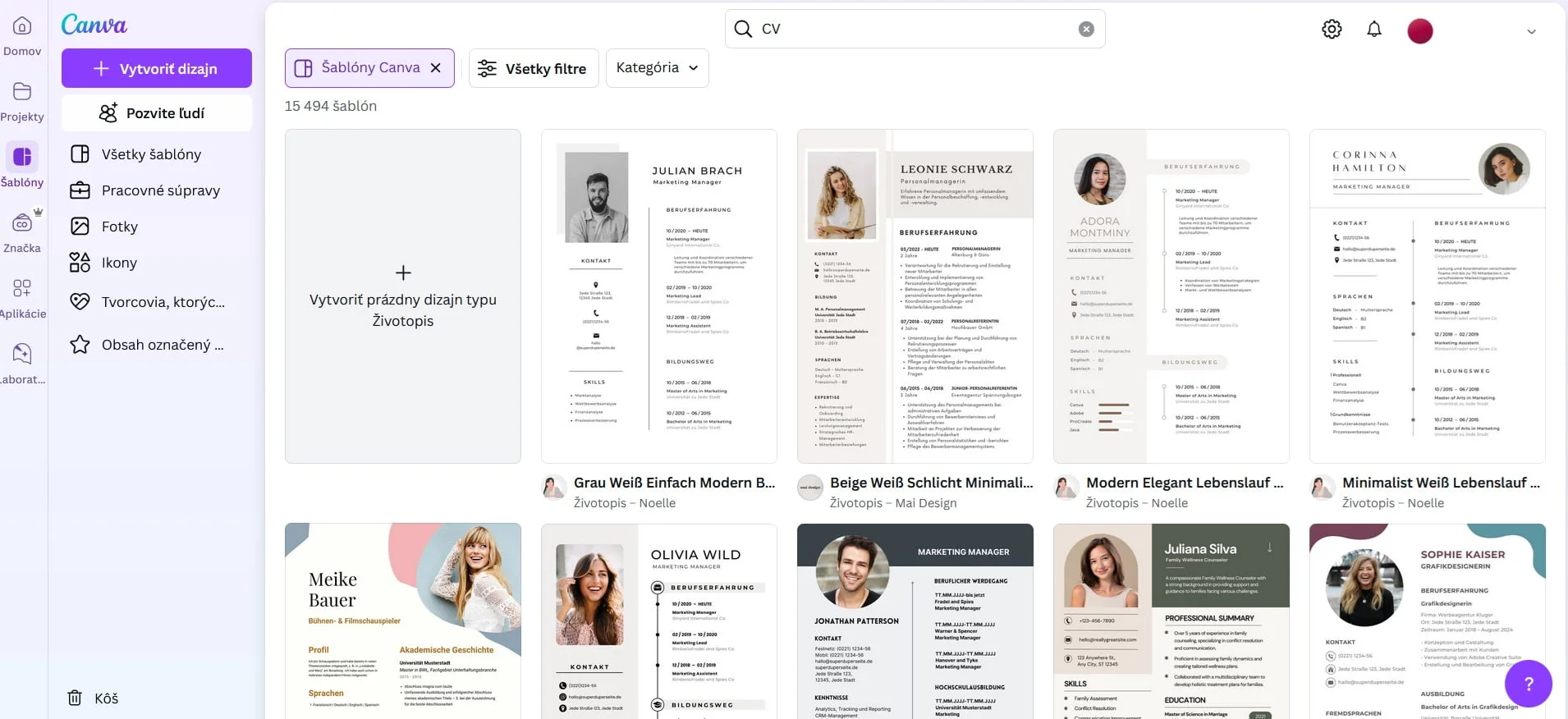
Today, you can create your resume in a variety of handy tools that make the whole process fast and the result looks original, modern and professional. These tools include Canva, which offers countless interesting templates — some minimalist, others more elaborate. Choose a style that fits the field you want to work in.

choosing a CV template in Canva

In the case of administration, public administration or the economic field, it is ideal to choose rather simple and austere design. On the other hand, if you’re into writing, web design or photography, don’t be afraid to experiment with bolder and more creative templates.

Recommend
We recommend:

If you’re using Canva to create your CV, keep in mind that most of the templates are tailored for the US job market. American CVs are slightly different from Slovak ones, so make sure your document contains everything that Slovak recruiters or potential employers require.

Internet job portals for resume template

The Profesia.sk portal provides a simple resume template, where you fill in the necessary information in the relevant sections, save the document in PDF format and send it to the potential employer.

You can also find many other portals on the Internet that offer quick resume creation, such as Kickresume.com or Kariera.sk.

You can prepare your student CV using the practical editors

College resume in Word doc

You can also write your resume in Word, but this option is the hardest. You will have to create the whole document from scratch yourself. If you want your resume to look its best, you’ll need to get the formatting right – spacing, font size and color, as well as sectioning.

Graphic editors, patterns and college student resume examples

You can also use various graphic editors or Google templates available on the Internet. These templates can be downloaded, filled in, saved and submitted. There are more than enough options nowadays, so you don’t have to worry about making your resume lengthy or difficult.

What format should I choose for my undergraduate resume?

Resume creation tools are important, but the correct structure of the document is equally important. In general, there are three basic structures.

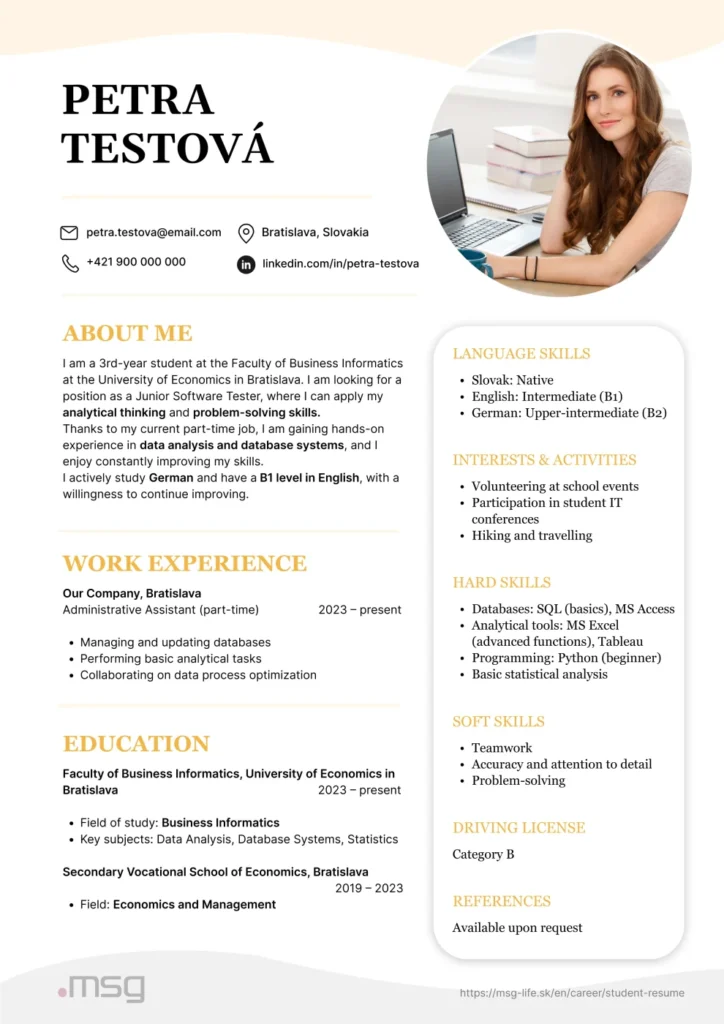
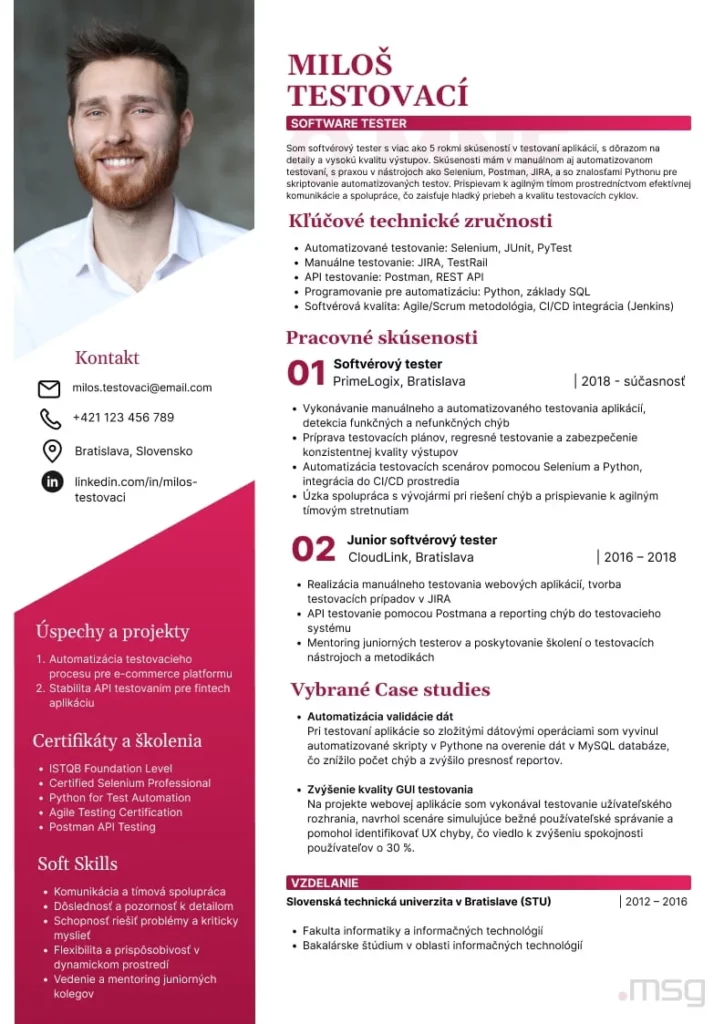
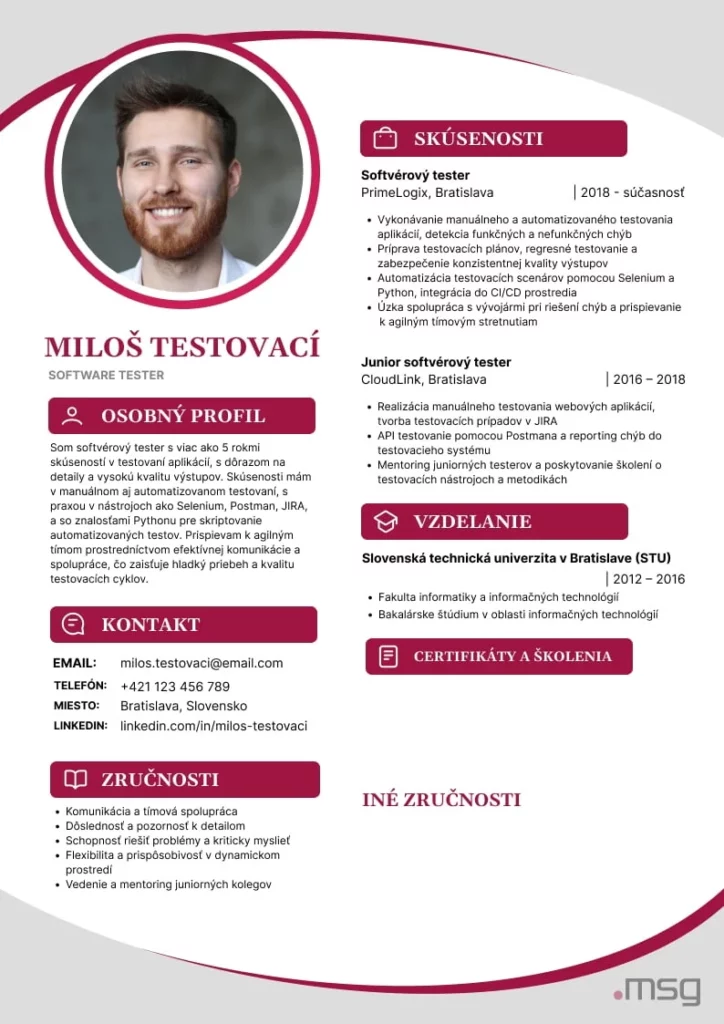
student resume CV example


Chronological structure – When work experience comes first

This format is most commonly used by candidates applying for full-time positions. It focuses primarily on work experience and career success, which are presented in detail. Sections like education or interests are typically secondary.

A chronological resume begins with personal information, followed by work experience, education, skills, and optional sections.

Functional structure – The best format for your resume template

This structure is the opposite of the chronological format — it emphasizes skills and strengths, while work experience takes a back seat. It’s ideal for high school and college students who don’t yet have extensive professional experience.

A functional (or skills-based) resume starts with personal information, followed by key skills with detailed examples — for instance, from internships or competitions — then education (don’t forget to include academic achievements, thesis titles, or project summaries), work experience, and optional sections.

Combined structure – a hybrid compromise

As the name suggests, this format combines elements of both previous types. It gives equal weight to skills and work experience, making it a good option for students who already have some professional background.

A combination resume starts with personal information, followed by skills, work experience, education, and optional sections. This format is more demanding to structure well, as it requires balancing all the key sections evenly.

Sample resumes for undergraduate students

A resume for high schools students differs from one written by college students. This is mainly because high school students have less experience and are usually mainly interested in summer jobs rather than internships or jobs they could continue after graduation.

If you study, you should create strong bullet points in which you include the following information:

  • short introduction/bio – summarize the most important information about yourself
  • personal and contact details
  • skills and strengths
  • education – please indicate the school you are currently attending, together with the year you expect to graduate
  • work experience – if you have any
  • optional sections – as required

In order to make your resume interesting, it is important to highlight different types of skills and strengths. Mention some of your soft skills such as:

  • communication skills
  • organizational skills
  • teamwork
  • creativity
  • empathy
  • responsibility
  • critical thinking
  • ability to work under stress

Don’t forget to include hard skills which may include:

  • basic IT skills (e.g. working with word processors, knowledge of Photoshop)
  • language skills
  • basic accounting
  • data handling
  • sports abilities
Did you know that…

…one of the factors that can influence the selection of a candidate for a job is a reference? A reference from a teacher or trainer provides a potential employer with an assessment of you and serves as a confirmation of the skills and abilities you have listed on your resume.

Types of resumes for a high school student

The information you put on your resume varies according to what type of writing you do. For example:

  • College application resume – highlight your grades in relevant subjects, extracurricular activities, and work experience
  • Part-time job resume – make it clear you’re still a student, and focus on your work experience and skills (both hard and soft)
  • Internship resume – this depends on the internship, but it’s a good idea to emphasize academic achievements, extracurriculars, courses, and relevant skills.
Curriculum Vitae for high school and college students

Structured resume – sample for college students

Most college students already have some work experience, so their resume doesn’t feel too empty. Still, it’s a good idea to choose a skills-based structure that focuses on strengths. A well-structured resume includes:

  • A short summary about you
  • Personal and contact details
  • Hard and soft skills
  • Education
  • Work experience
  • Other optional sections
Recommend
We recommend:

The reason why a professional structure is the best choice is that even if you have work experience, it’s usually just temporary jobs or internships. That’s why the most important part of your CV is your hard and soft skills.

Resume types for a university student

The resume you send should reflect the type of opportunity you’re applying for:

  • Internship resume – include hard and soft skills, academic achievements, extracurricular activities, volunteering, and relevant courses
  • Job resume – if the job aligns with your major, focus on your education, relevant courses, academic performance, extracurriculars, and skills.

Tips for writing a student resume

If you want your resume to be the best it can be, follow these recommendations:

  • Clearly state that you’re still a student so employers understand you have other responsibilities.
  • Only include relevant information that might interest a hiring manager.
  • Make the most of your skills – briefly explain them and how they apply to the job.
  • Don’t make things up – if you don’t have certain skills, leave them out. You can always say in the interview that you plan to learn them.
  • Don’t overdo the design – clean, simple, and readable resumes work best.
  • Proofread your resume several times, and ask someone else to review it for errors or details you might have missed.

How to build hard skills through training and learning

To catch an employer’s eye, your resume should highlight hard skills — the technical abilities you can apply to get the job done. These are not innate but learned through training and education. You can build hard skills through:

  • courses
  • online tutorials
  • internships
  • trainings
  • language schools
  • mentoring

Common IT hard skills include, for example, proficiency in programming languages, knowledge of algorithms and data structures, computational and mathematical skills, and many others. Remember that you should only include hard skills in the job description section on your resume.

Hard and soft skills are key on a student's CV
Hard and soft skills are key on a student’s CV

How to build soft skills through habits and class engagement

Soft skills are abilities that are often acquired naturally, but can be developed over a lifetime – they can be both innate and learned. They are qualities and traits that characterise you. While they may not seem as essential as technical skills, many jobs require strong soft skills.

As a student, you have many opportunities to grow them:
Teamwork, presenting projects, receiving feedback, and engaging in class discussions all help. Sometimes, you’ll need to build soft skills through habit — for example, to improve time management, create a weekly schedule and stick to it.

Classic soft skills include, for example, team leadership, teamwork, ability to work under pressure, creativity, critical thinking, and more.

Structured CV: What makes it distinctive and what does it look like?

In the article you will learn:

  • What is a structured CV and what makes it distinctive.
  • What types of structured CV do we know.
  • What to watch out for when writing it.

Structured CV – a phrase that everyone who has looked for a job at least once in their life has come across. It is required by many employers, and a template for it is provided by several programs that will make it easier for you to create. But how does a structured CV differ from other types and what to look out for when writing one? We’ve got all the key information to help you get to the interview.

What is a structured CV?

A structured CV is a simple document that contains all the information found in any type of CV. This means that you should include:

  • your personal data and personal profile,
  • work experience,
  • level of education,
  • technical or language skills,
  • additional information about your strengths.

So what makes a structured CV different from others? The most striking feature is that it is clear and concise. You write the information concisely and in words – usually describing it in just a few words or shorter sentences.

Most of the information is presented in bullet points, with each section of the CV separated by a distinctive subheading or horizontal line. This makes the document easy to read and the recruiter can find all the necessary information in a fraction of a second.

Recommend
We recommend:

The structured CV is brief. It should not contain long paragraphs of text. If you wish to provide more information, you may attach a cover letter. Alternatively, include a few important details in application letter.

What makes a structured CV distinctive?

Creating a structured CV is much easier when you have a clear picture about it. The following characteristics will help you do this:

  • Clear and logical structure – as we have already mentioned, this type of CV is written in bullet points and short sentences. You only include the essentials, such as the title of the jobs you worked at, the period of time you worked there, the name of your high school or university, your language skills, etc.
  • Relevance – by writing only briefly about each job or educational background in a structured CV, you avoid the risk of providing unnecessary and irrelevant information that could come across as unprofessional.
  • Data organisation – you can organise the data in the structured CV in several ways. Whichever you choose, they are all clear and ensure that the document is not messy and reads well.
  • Presenting achievements and skills – by presenting information only in bullet points and not in long sentences, you allow your achievements and skills to stand out. The recruiter will immediately notice your work experience, education, etc.
In what way does the structured CV stand out ?
The information in the structured CV is clear and concise
  • Formal appearance – when you look at a structured CV template, you’ll notice that it’s simple. As a rule, it has a white background with a black font in a uniform size. This makes it look professional and suitable for almost every industry and job.
  • Customisation – A structured CV may not offer the creative possibilities of a modern CV, but that doesn’t mean you can’t customise it. Feel free to add optional sections such as personal interests or references. However, always make sure that the information you provide to a potential employer is relevant.
  • Attachments – A structured CV is usually accompanied by attachments that reveal more about your work experience or personal qualities. These include, for example, a motiovational letter. In it, you should mention why you are interested in the job offer and what you can offer to the employer. Other attachments can be references and a cover letter, which you write either as a separate document or in the body of the email.

What are the advantages and disadvantages of a structured CV?

When you decide on this type of CV, you should know what are its biggest advantages and disadvantages.

Benefits include:

  • It is clear and simple– it gives all the information about you directly and without unnecessary “cotton wool”.
  • It is suitable for almost all job roles – most industries now prefer a minimalist and simple CV, such as this structured one. This is because recruiters don’t have time to read long paragraphs, such as in a fictionalized CV.
  • It’s very easy to write – listing work experience or skills in bullet points can be done by absolutely anyone. What’s more, today there are a number of programs that can help you create a document.
  • It has a professional design that you’ll never go wrong with – as long as you don’t combine different sizes, colours and font types, you don’t have to worry about your CV looking messy or unprofessional.

On the other hand, a structured CV also has its disadvantages, which are:

  • Sometimes it’s too brief – recruiters may miss important information about you that could help them decide whether to hire you for the job. It’s therefore ideal to supplement it with additional attachments such as references or a cover letter.
  • It is not original – although a structured CV is very practical and recruiters will get a lot of important information from it, it is not original at all. Your document will be no different from those sent by other candidates. Therefore, it can be difficult to impress and stand out from the crowd.

Structured CV – template and basic structure

According to the type of structure, we divide the structured CV into three basic categories:

  • chronological biography,
  • professional CV,
  • Combined CV.

We’ll talk more about each.

Chronological biography

The chronological structured curriculum vitae is one of the most widely used. It is characterised by its focus on your work experience, which it prioritises above all others. That’s why this information is more comprehensive and is at the top, usually just below personal details such as phone number or address.

Under work experience, education is listed, followed by skills and abilities, and then additional information you would like to use in a future job. However, all of this information is only given very briefly.

The advantage of a chronological structure is that it is established and highlights your work achievements. On the other hand, the disadvantage is that it is used by almost everyone and is therefore the least original of all.

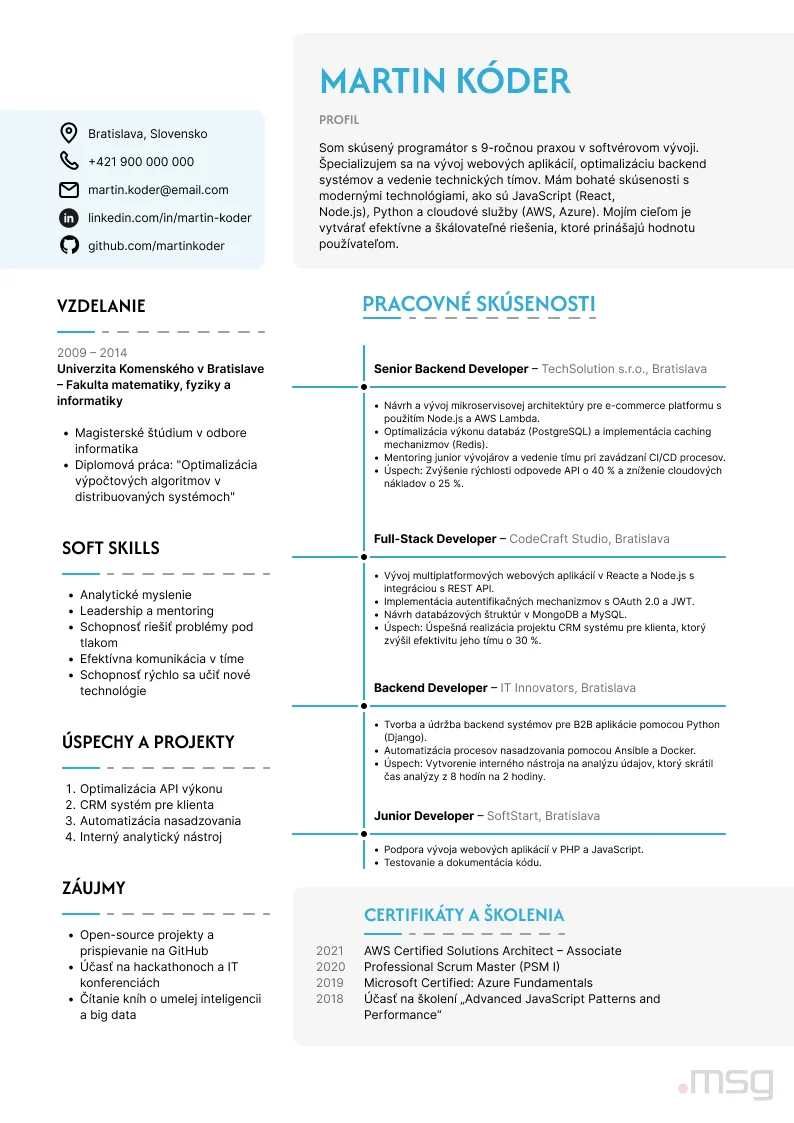
A sample chronological biography looks something like this:

  • personal and contact details,
  • work experience,
  • education,
  • skills,
  • additional optional sections – interests, driving licence, etc.
Recommend
We recommend:

Some people include a shorter introduction of four to five sentences in a structured CV. In it, they introduce themselves in a quick and interesting way and give a few details that can give the recruiter a better idea of their experience and knowledge. Such an introduction comes across as very human and can set you slightly apart from others. If you don’t want to write it directly in the document, process it in the form of a cover letter.

Professional CV

A professional CV, sometimes referred to as a functional CV, focuses mainly on your skills, such as knowledge of a foreign language or operating programs. It also focuses on your strengths, which may include meeting deadlines, ability to work under stress, flexibility, and so on.

You should choose two to four skills to describe in bullet points on your CV. You can mention how you used them in your last job, where you acquired them or how you would like to use them if you get the job.

A professional CV has several advantages. Among them is that it is more original than a chronological one. By highlighting your strengths right at the beginning, you slightly distract from the weaker job section. The downside, however, is that some recruiters may not be satisfied with brief information about your career.

This type of CV is particularly ideal for:

  • high school and university graduates who have no hands-on experience in the field,
  • people with significant gaps in their working lives (they have not worked for several months or years),
  • people who have decided to change careers and this is their first job in a new field of work.

And what are the elements of a structured CV? The template generally looks like this:

  • personal and contact details,
  • a summary of the skills and a short description of them,
  • education,
  • work experience,
  • optional sections.
A professional CV is great if you don't have much experience
A professional CV has several advantages, especially for a graduate

Combined CV

The combined CV represents a happy medium between the chronological and the professional structured CV. It is characterised by giving equal space to work experience and skills. It’s a great choice for those who have a career path without major gaps, while possessing multiple practical and relevant skills.

The strength of the combined structure is that it provides comprehensive information from both areas, not just one. However, the disadvantage can be more complicated to prepare, as this type of CV is the most comprehensive of the three.

To maintain a balance between the two parts, it is good to stick to this structure:

  • personal and contact details,
  • relevant skills,
  • work experience,
  • education and study experience,
  • optional sections.
Structured CV - Combined CV template
What a combined CV looks like

At the same time, try to make the skills and work experience sections similar in length.

Recommend
We recommend:

Remember that information in a structured CV (regardless of the structure chosen) is always presented in reverse chronological order. This means that you mention the last job you held or the last school you attended first, and work your way up to the very first one.

Which structure to choose?

The choice of structure is up to you and your needs. Most people choose a chronological structure focused on work experience, as this is the form most often expected by recruiters in Slovakia.

However, if you’re a recent high school or college graduate, or if you haven’t worked in the field before, bet on the career structure. If you want to elevate both your personal skills and your professional achievements, choose a combined structure.

CV formatting

Formatting is key because it affects the look of your CV and the first impression you make. So stick to these rules:

  • Choose one font to use throughout the document.
  • The font size may be different in subheadings that separate different parts of the document.
  • The subheadings can be a different colour, but don’t complicate it unnecessarily.
  • A structured CV should be one, maximum two pages long.
  • Save the finished document as a PDF that opens without problems on any device.
  • Make sure you have equal alignment and consistent spacing throughout the document.

In what areas is a structured CV used?

Today, the structured CV is used in almost all fields, including administration, government, banking, management and services. It is particularly advantageous for recruiters who can go through it very quickly and find out what your strengths are and whether you are a suitable candidate.

The one exception where a resume with a clear minimalist structure might not be the ideal choice is in creative fields. In those, potential employers may expect a document that is more elaborate in design.

Try creating a structured CV

A structured CV is clear, logical and simple. It gives recruiters all the key information about you and helps you land your dream job. Use the tips we’ve given you to quickly and easily create a professional CV that’s eye-catching and free from unnecessary mistakes.

Podcast #4: New Year’s resolutions – goals and time management for 2025

Have you made your New Year’s resolutions? In January’s episode of the Na Vlne Kodu podcast (in English “On the Wave of Code” podcast), we take a look at why we sometimes fail to achieve what we set out to do and how to follow the step-by-step process to make sure we manage fulfilment of the resolutions with joy and without stress. Our guest for the second time is Dominika Neprasova from the online platform Ksebe.sk.

Today we are going to talk about a topic that is especially important at the beginning of the year, when many of us are setting new plans and resolutions. Some New Year’s resolutions we keep, others we don’t. That’s why we have prepared a special for you called From Plans to Reality: Goals and Time Management for 2025.

We’ll take a closer look at why we often fail to achieve our goals, whether it’s a flaw in planning, lack of motivation or lack of time, which we often make excuses for. How do we set New Year’s resolutions and goals so that we don’t lose motivation after just a few weeks, but have the energy and joy to keep going throughout the year?

Our guest Dominika Neprasova – a psychologist who specializes not only in career, but also in personal development, self-development, stress management and finding a balance between work and private life – will answer all these questions.

Don’t miss this inspiring discussion with our HR manager Ivka to help you achieve work-life balance in 2025. We wish you a pleasant listening or reading experience.

Recommend
We recommend:

Na Vlne Kodu Podcast (in English “On the Wave of Code” podcast)

Na Vlne Kodu is an IT podcast from msg life Slovakia, which regularly brings you topics from the field of psychology, HR and news from the IT world. Listen to other episodes of the Na Vlne Kodu podcast.

Dominika, let’s take a closer look at our plans for this year to make everything work. If there was a perfect planner, what would it contain? Coffee in the morning, a Netflix break in the middle of the day, and a spa in the evening? What do you say, wouldn’t that be great?

It would be great, but where is the room for responsibilities? We should not forget about those, because we always have them. Everyone’s vision of the perfect plan or planner can be very subjective and everyone should set it up for themselves.

Is it better to plan new goals right from the beginning of the year? Can it backfire if we don’t? Or can we set them at any time throughout the year?

The New Year tempts us to set new goals, visions, resolutions, because the year is changing and something new is beginning. This evokes in people that they should make a change in their lives.

But whether we set goals at the beginning of the year or during the year is completely equivalent. We don’t have to push everything to January 1, 2025, we can spread our goals out and start at any time. Whether or not we set them is up to us, it won’t backfire.

Why are New Year’s resolutions so difficult to keep?

The internet is full of articles about New Year’s resolutions. Many people talk about them and attribute symbolic or even magical power to them. I would use an interesting metaphor from a psychologist colleague of mine: if you want to get a rabbit into a cage, you have to give it little carrots all the way. You can’t lure it to one big carrot at the end of the road. Because if the rabbit doesn’t experience how sweet the carrots are all along the way, it won’t be interested in the big one at the end and may look at it with suspicion.

The key to great success is experiencing these small successes on a regular basis. New Year’s resolutions often fail because we don’t take one step at a time. We set goals that are too big, we chase after them, and the pressure builds. Many times they are beyond us – we make too many resolutions. This then leads to feelings of guilt, of failure, it can demotivate us. It’s one big vicious circle. I’m not saying that New Year’s resolutions are bad, but how we approach them is important.

Recommend
We recommend:

Listen also: In our podcasts, Dominika and I have already discussed topics such as Work-life balance and healthy work-life boundaries.

How many New Year’s resolutions do people actually keep? Is there any way to quantify that percentage or do you have experience of how many people are successful?

I’ve seen various stats, but I wouldn’t like to pigeonhole things too much because it’s a very individual issue. I think it is important to think about why people make resolutions and what they want to achieve. It’s not about how many of them they actually do or don’t fulfil, it’s about why they make them in the first place and what the purpose of that behaviour is.

Realistic goals help us break tasks down into manageable steps and see incremental improvement, which boosts our self-confidence. Should we take it easy or jump straight to the big challenges?

Every wall or house is built brick by brick. That is the best metaphor for anything that requires some work and is intended to lead to some result. Big challenges can discourage us, exhaust us, but when we take one step at a time, we immediately have more motivation, energy and desire.

It’s less discouraging because if we fail at something small, it’s still better than failing at something big. It’s taking a few steps in a row that has really positive effects. And that’s just one tip that motivates us to keep our resolutions.

If I have a lot of goals and big ambitions, is it better to divide them into smaller steps? Usually we tend to go for everything at once, because we want everything – preferably here and now.

Exactly. But when I want everything, right away and all at once, it’s not a long-term solution. We will always get to that long-term goal in simple steps and systematical work. There are some things we can’t rush, they just take time. Moreover, and I like to say this a lot in therapy to clients – the journey itself is the goal.

If I have many goals, how do I know which one is most important to me?

Deciding where to start is one of the most difficult questions. And I don’t just mean in New Year’s resolutions, but in other areas as well. What do you prioritize by? I say to my clients that we are the authors of our goals and we should naturally know why we formulate and set them. If we don’t know, we can work with a psychologist to figure it out.

I find questions such as “What is my goal, why do I want to achieve it?”, ” If I don’t succeed, will I be sad or will I get over it with ease?”, “What is the purpose of my behaviour, why do I want to achieve it?” to be helpful. I very much like to ask this question in therapy: “If I asked you a year from now the same question I’m asking you now, would you have an answer to it? Would you have achieved your goal?” It’s very difficult, but it can be broken down into small pieces. Step by step, we can then arrive at answers we didn’t know before.

When is a goal too distant to reach?

Some goals are impossible to quantify, but I would say that a goal is too distant to reach if the mere thought of it or its formulation creates feelings of anxiety or inadequacy in us. When it occurs to us that I can’t do it, that I’m going to fail here. Alternatively, that I’m going to need too much effort and I’m tired of it, and I haven’t even started working towards that goal yet. In such cases, we can talk about the goal being really too far away to reach, beyond our capabilities.

How to estimate whether a goal will motivate us in the long run or will exhaust us very quickly?

We can never know for sure, because our motivation can change. But whether or not it will motivate us in the long run does not depend on that particular goal, but rather on our setting, our beliefs.

Motivation is our internal matter. We have to know why we do things and when we know that, we are naturally motivated. When we stop enjoying it, the motivation goes down and we just move on to something else. There’s no need to stay in places that we no longer enjoy or find fulfilling.

How do you stay motivated for the long term? Can you recommend some practical tips to help us stay on track? What helps people stick to their goals so that they don’t sabotage themselves in achieving them?

Above all, don’t overdo the beginning. Take your time and proceed slowly. Imagine not only the goal itself, but also the journey that awaits you. Set your goals in moderation so that they are realistic and achievable.

In therapy, I really like to work with clients on self-love: to be kind to yourself and not just listen to the inner critic that pushes you down and tends to sabotage things. And it also helps a lot when you make a plan and reward yourself at the end.

When our motivation drops, is it better to surround ourselves with motivated people or watch a motivational video? What can get us going again?

It depends. For someone, watching a motivational speaker or a successful person will help. Conversely, someone finds it frustrating and feels even worse. Their inner critic is loud – I don’t have it this way, why can’t I have it that way?

I think we should start with ourselves. That is, when our motivation drops, we need to understand why it happened to us and what we can do about it, how it affects us, how it makes us feel. And then in the next steps we can be inspired by some motivational speakers, for example. But let’s always start with ourselves – I think that’s the most cathartic thing to do. Because looking first at others before ourselves can be effective, but not always.

How to plan our days when we’re not feeling our best? How to overcome ourselves?

There is an oxymoron, a contradiction, in the question itself. Why should I outdo myself when I don’t feel my best? Why should I perform if I have to slow down? People nowadays lose compassion for themselves and fail to take care of themselves. Why can they take care of others but not themselves? Even on a plane, I should put the mask on myself first and then other people.

The goal is not to burn out and still be productive. The goal is to feel satisfied and happy. To be kind to yourself. Because otherwise we’re prone to burnout. And we do not want this.

What do people who achieve their goals do differently than most of us?

These people have clearly defined goals. These goals make sense to them, they know why they are doing it. And these goals are incremental, not big, megalomaniacal. At the same time, these people have a specific plan to achieve them. They enjoy the journey itself, and they enjoy the mistakes and missteps they make along the way. Because that’s part of the game too. They have good time management and know how to prioritize.

And very importantly, they relax and allow themselves to make a mistake and fail. They accept that not every performance has to be 100%. They know that they can make mistakes and that things can go wrong. Because that’s part of life too.

There are many techniques to succeed. Which time management techniques do you find most effective?

As you say, there are many time management techniques defined by experts. I like the classic to-do lists the best – to-do lists where a person ticks off what they’ve done, what they haven’t done, puts it on paper so it doesn’t get stuck in their head. I find it the most efficient and it’s worked for me all my life.

At the same time, the most effective way of time management is to plan my activities, i.e. when I will do what, so that I have order and structure, I can think about my rest and activities with other people. And Pareto’s 80:20 rule works quite well too – not wanting 100% of everything, but keeping some balance in it all.

Recommend
We recommend:

Our tip: We’ll be covering the topic of time management in more detail in the next episode of the Na Vlne Kodu podcast.

Dominika, which time management technique will suit our listeners best?

I can’t determine what will suit ours listeners because it’s very individual. But there are several techniques – for example, the Pomodoro technique or the Time Boxing technique. Personally, I was very interested in the GTD – Getting Things Done technique, which focuses on completing individual tasks.

GTD consists of five simple steps that teach a person to plan effectively, prioritize and set realistic goals. The first step is RECORDING, or writing down every task that comes to mind. The second is CLARIFYING which task is accomplishable TODAY in specific steps. The third is to ORGANIZE, that is, to categorize the tasks and put them into contexts – for example, this is a task from the Work category, this one is from the Home category, this one is from the Friends category, and so on. The fourth point is to REFLECT, that is, to run through your list from time to time to see which tasks are done for the week or which are a priority and have not been done yet. Well, the last step is to ACT – it’s time to get down to work, don’t think too much about it, don’t organize, don’t plan, just start working.

I also recommend the book Getting Things Done by David Allen. It is really exceptional. Do you think it is good to plan every hour of the day or rather to work with a looser time frame?

Again, it’s very individual. Both methods have their advantages and disadvantages. They can also alternate depending on what our days look like. I really like to have one busy day at work full of therapy sessions and then an easy day when I come in for a podcast, for example. It very much depends on the personality, but also on the context or what is going on at the moment.

Dominika, could you explain what is digital detox or dopamine detox and what do you think about these trends?

Yes, these are very fashionable concepts. There was even a Digital Detox movement started in America in 2010 in response to the growing use of smartphones and other smart devices, as well as the growing importance of social networking and the constant access to the online world.

Digital detox is designed to reduce stress and over-stimulation. Digital detox is also related to compulsive behaviour that is caused by the use of technology. Common digital stressors include spending long hours in front of the TV, excessive consumption of online media content, or excessive smartphone use. This is a very important topic that I think rises to the top of what clients in therapy, or people in their lives in general, are dealing with.

How should we divide our time so that we also pursue personal goals, not just work?

We have control over how we make choices and what we pay attention to. And although it may sound complicated, if we care about something, we can squeeze it into our schedule quite easily. For example, if we want to go exercise, we can do it before or after work. In collaboration with a colleague or boss, we can allocate work efficiently. In my opinion, it’s not such a big deal to divide our time when we are aware of what we want, why we want it, where it can get us, and what we need to do to get it.

Is it a good idea to keep work and personal life strictly separate or should I give myself more room for spontaneous decisions?

What would you gain if you strictly separated them and if you didn’t separate them? Spontaneity can arise in both cases, there are pluses and minuses. It always depends on the individual person and what suits them better.

Sometimes work and personal life overlap, other times we strictly separate them. When we’re dealing with something serious in our family, either positive or negative – planning a wedding, having a baby, or being sick – that’s when we have the motivation to separate the two more strictly. If something like that is happening to us, it’s okay if it overlaps, as long as it’s okay for us.

What can happen if we neglect personal goals in favour of professional ones?

This can be a big problem. A lot of people come in frustrated that they wanted to achieve something else. They feel like they’ve failed, that their life is meaningless, that they’re dissatisfied and everyone else around them is happy.

However, it is important to remember that I AM responsible for my life and my decisions. If a personal goal is important to me, how is it possible that I have forgotten it? How is it possible that it has been overridden by something else? I need to go back to this in self-reflection and figure out if it was my honest personal goal, or if it was pressure from those around me and I just thought it was my goal. When I take the time to think such thoughts, they can reveal the answers to my questions.

If we feel that time is just passing by, how can we set boundaries and divide our responsibilities?

We have to prioritize – what do I need to do, what can wait, why do I need to do it today, can I put it off until tomorrow, where do I start, what do I continue. Time never stops. Sometimes it seems to go faster than it should, we can’t control it. What we can control, however, is how we set boundaries, how we prioritize, and how we divide those responsibilities. That is our greatest responsibility. And time – forget about it, let it go.

Finally, Dominika, I would like to ask you to summarize the points. How can we set our goals correctly so that we can easily manage them? So that we do not have unrealistic expectations and so that we move nicely step by step throughout the year to where we want to be?

Start with the right setup in mind. As we said – small goals, one step at a time or Pareto’s 80/20 rule. Then create an action plan of what you want to achieve, how you want to achieve it, and why you want to achieve it so it makes sense to you. Start practicing compassion and kindness towards yourself so that if something does accidentally go wrong, your world doesn’t come crashing down.

Allow yourself to make mistakes and missteps and fail. Take life easy so it’s not just about chasing goals and achieving them. I understand that everyone wants to fulfill their potential, develop and achieve their goals. But we have a limited number of years in this world, and if it’s always just about that, many times ordinary moments and little things slip through our fingers and sadly, they won’t happen again.

Only we can influence our success. What is the first step we should take this year to make it happen?

It is very important to realize that I am responsible for my life, my behaviour and experience, and for the change itself. Without this awareness we will not move far and we will be disappointed. When people come to therapy, they expect the psychologist to tell them how to change and ideally to make that change for them. But that’s not how it works. We hold the change in our own hands, and we need to start with that awareness.

I keep my fingers crossed for everyone facing some change. The symbolic beginning of it does not have to be a new year. We can start at any time – whether it’s January 1 or October 31. Everyone has their time.

Dear listeners, thank you for joining us today and listening to the episode –

From Plans to Reality: Goals and Time Management for 2025. My guest today was Dominika Neprasova. Dominika, thank you for accepting our invitation and sharing your valuable experience and advice with us. I hope that we will meet again on other topics.

Thank you very much, Ivka. My fingers are crossed for all listeners in their New Year’s resolutions and I look forward to the next podcast!

My name is Ivana Hricova and I hope that after today’s episode you will find it easier to set your plans and manage them with ease. In the new year of 2025 your msg life Slovakia wishes you endless strength, determination, courage in every step you take. May every day become an opportunity for your growth, success and the fulfilment of your dreams. We believe that this year will be yours. And remember that every small step forward brings you closer to your big goals!