


Rule-based automation can pay a small claim on its own, but it cannot handle a case the rule did not foresee. AI-enabled workflows read inputs such as claim descriptions and photos and pick the next step for each case, which raises a new question for insurers: who can explain the decision afterward? This guide covers workflow types, tools, ownership, building a first pilot, and the compliance questions to settle before go-live.

What is AI workflow automation and why does it matter for insurers?
AI workflow automation is the use of artificial intelligence to automate, optimize, and orchestrate complex business processes in insurance, such as claims processing, underwriting, and customer service. Traditional automation follows rules a person wrote in advance; this kind of automation interprets context and handles exceptions case by case (Stephanie Trovato).
A typical rule reads: if a claim amount is below a threshold, pay it automatically. An AI-enabled workflow adds a layer that reads unstructured data, such as the claim description and photos, and adjusts the next step to what each case contains.
For insurers, this distinction carries weight because of volume and regulatory exposure. A mid-size insurer processes a high volume of claims, underwriting referrals, and service requests each month. Each one generates documents, data points, and decisions that must stay auditable. A workflow that cannot show why it paid, declined, or escalated a claim leaves a gap in the audit trail.
This guide treats the topic as a business process concern first and a technology concern second. The processes it touches (claims, underwriting, and customer service) carry duties under insurance regulation that a generic automation guide does not address.
Prerequisites
This guide assumes the reader already knows their organization’s core insurance processes and has basic familiarity with IT and AI concepts.
Before applying the steps in this guide, confirm three things. First, you need to know how your claims, underwriting, and customer service processes work today, including who owns each decision point. Second, you need access to historical case data for the process you plan to automate, since Step 4 below depends on it. Third, you need to know what this guide does not cover. It does not explain how to build or train an AI model from scratch, and it does not walk through the EU AI Act article by article.
Key concepts and components of an AI workflow in insurance
An AI-driven process in insurance has five recurring components: data ingestion, orchestration, a decision layer, human checkpoints, and monitoring. Each plays a distinct role, and a design missing one of them is harder to audit.
Data ingestion pulls structured and unstructured inputs (policy records, claim photos, call transcripts) into a format the process can use. Orchestration sequences the steps and decides what happens next based on each input. The decision layer is where a model or a rule set produces an output: approve, deny, escalate, or request more information. Human checkpoints are the points where a person reviews, confirms, or overrides that output. Monitoring tracks performance over time, including how often humans override the system.
Example: Claims first notice of loss
A policyholder submits a first notice of loss through a mobile app. The system ingests the claim description and photos. An AI component classifies likely severity and potential fraud indicators. The orchestration layer routes straightforward claims to automated payment and routes complex or flagged claims to a human adjuster. The adjuster’s decision then feeds back into the monitoring data.
A traditional process routes claims with fixed rules, such as an amount threshold, that cannot read the claim description or photos. This design routes dynamically, based on what the data suggests about each case.
Types of AI workflow automation in insurance
This guide groups AI workflow automation in insurance into three types, defined by the core process each one serves: claims, underwriting, and customer service. Each has a different data profile and a different owner.
Claims workflows process first notices of loss, damage assessments, and payment decisions. Underwriting workflows process new business applications, renewal risk reviews, and pricing inputs. Customer service workflows process inquiries, policy changes, and complaint handling.
| Workflow type | Process | Example AI use | Responsibility |
|---|---|---|---|
| Claims automation | First notice of loss through settlement | Damage classification from photos, fraud flagging, automated low-value payment | Claims operations lead; fraud analyst for flagged cases |
| Underwriting automation | New business and renewal risk assessment | Risk scoring from application and third-party data, referral triage | Underwriting lead |
| Customer service automation | Inquiries, policy changes, complaints | Intent classification, automated responses, escalation to human agents | Customer service lead; complaints officer for escalated cases |
Ownership matters because each type carries its own regulatory touchpoints. Where a workflow’s output feeds the calculation of technical provisions, the data it relies on falls under Solvency II’s data quality requirements, which the compliance section below explains.
Insurance use cases for AI workflow automation
AI workflow automation delivers its clearest value in insurance at a single, well-defined decision point within a process, rather than across an entire end-to-end operation. Three use cases illustrate this pattern.
Claims triage and settlement
Input data includes claim descriptions, photos, and policy terms. The AI component classifies severity and likely fraud risk. Output is a routing decision: automated payment, manual review, or investigation referral. The claims operations lead is accountable for the routing logic and its accuracy; a fraud analyst owns flagged cases.
Underwriting referral support
Input data includes application details, third-party risk data, and historical loss information. The AI component scores risk and flags applications needing human underwriting judgment. Output is a referral recommendation. The underwriting lead remains accountable for the final pricing and acceptance decision.
Customer service triage
Input data includes customer messages, call transcripts, and account history. The AI component classifies intent and drafts responses for routine requests. Output is either an automated reply or an escalation to a human agent. Since August 2, 2026, Article 50(1) of the EU AI Act has required providers of AI systems designed for direct customer interaction to ensure that customers are told they are interacting with AI, unless this is already obvious in context. The customer service lead owns response quality; a complaints officer owns escalated disputes.
Insurance context
In the designs described here, the system decides on its own only for favorable outcomes, such as full payment of a low-value claim, and that decision still falls under GDPR Article 22. For any adverse case with a legal or similarly significant effect on the customer, its output is a recommendation or a routing decision. A named role remains accountable for claim denials, underwriting declines, and complaint resolutions. This shapes how the workflow is designed, tested, and audited at each step.
AI workflow automation tools and platforms: What’s relevant for insurers?
Choosing a tool for an insurer means weighing integration with core systems and compliance features alongside speed and cost. General-purpose automation tools built for marketing or sales tasks often lack the audit logging and data residency controls insurers need.
Automation tools for this purpose fall into five categories, shown below with their fit for insurance use. Self-hosted open-source options usually give more control over data handling but need in-house engineering capacity to maintain; commercial platforms usually offer faster setup and vendor support, and some can also run in the insurer’s own environment.
| Tool | Type | Insurance fit | Example use | Compliance features |
|---|---|---|---|---|
| Generic no-code automation platform | Commercial, no-code/low-code | Moderate: needs custom controls added | Routing service tickets, scheduling follow-ups | Role-based access common; audit logging often an add-on |
| AI-native orchestration platform | Commercial, model-orchestration focus | Moderate to high, depending on connector availability for core insurance systems | Chaining AI models for claims document review | Model versioning and run logs typically included |
| Self-hosted automation engine | Open-source | High for data control; requires engineering investment | Internal claims triage pipeline with custom fraud rules | Depends entirely on in-house implementation |
| Insurance-specific workflow platform | Commercial, vertical-specific | High: built for claims or policy administration data models | End-to-end claims or underwriting workflow | Often includes insurance-specific audit trail features |
| RPA-based automation tool | Commercial, rule-based with AI add-ons | Moderate: strong for structured, repetitive tasks | Data entry into policy systems from structured forms, or from scanned forms with an OCR add-on | Rule-based logic is easier to trace, but bot run logs must be configured; AI add-ons vary |
An insurer prioritizing audit readiness is best served by an insurance-specific platform or a well-governed self-hosted engine. An insurer prioritizing speed of deployment is best served by a commercial AI-native platform that already has insurance connectors available.
This guide recommends weighing four factors, in this order: whether the tool integrates with existing policy and claims systems, whether it logs decisions in a way that supports an audit trail, whether its data handling meets residency and retention requirements, and what the total cost of ownership is.
AI workbench and workstation infrastructure for insurance AI workflows
An AI workbench is an integrated environment where data scientists build, test, and validate the models that power an automated process. An AI workstation is a high-performance computer, typically with GPUs, on which a data scientist develops and tests models locally; production workflows usually run on server or cloud infrastructure. Insurers need both configured for regulated data from the start.
An integrated AI workbench combines data access, model development tools, and testing environments in one place. A data scientist can build a model with fewer transfers of sensitive policyholder data between disconnected systems. This matters in insurance because policyholder and claims data often includes health or financial information subject to strict access controls.
Example: Help desk AI on a shared workbench
An insurer’s data team builds a help desk AI model, used to triage internal IT or policy inquiry tickets, on the same workbench used for claims models. Shared infrastructure lets the team reuse data pipelines and monitoring tooling. It also means access controls on the workbench must distinguish between internal IT data and customer policy data.
Selection criteria for insurance IT leads include three questions. Does the workbench support role-based access down to the dataset level? Does it log model training runs for audit purposes? Can it run in the insurer’s own cloud environment or data center, rather than only a vendor’s shared infrastructure?
How to build and optimize an AI workflow in insurance
Building an automated workflow in insurance follows six steps, from selecting the process to monitoring it in production. Skipping the data preparation or monitoring steps is a common source of failure after deployment.
Step 1: Select the process. What you need before this step: a list of candidate processes with their current case volume and decision logs. What to do: identify a high-volume process with clear, documented decision criteria, such as claims triage or underwriting referral, with enough historical cases to test against. What you should have after this step: one named process, confirmed by the process owner (the claims or underwriting lead), with a defined scope. Common failure point: choosing a process with too few historical cases to validate the workflow’s output; check the case count before moving to Step 2.
Step 2: Prepare the data. What you need before this step: the named process from Step 1 and access to its historical records. What to do: inventory, clean, and label the data the workflow will use, confirming lineage and completeness with the data owner. What you should have after this step: a documented dataset with known gaps and a named data owner. Common failure point: incomplete labeling of historical outcomes, which leaves the testing step in Step 4 without a reliable comparison baseline.
Step 3: Design the workflow. What you need before this step: the prepared dataset from Step 2 and the process owner’s sign-off on scope. What to do: map decision points, human checkpoints, and escalation paths with the process owner and a solution architect. What you should have after this step: a documented workflow design showing every automated decision point and its escalation path. Common failure point: an automated decision point with no defined escalation path, discovered only after a case the system cannot handle reaches it.
Step 4: Test the workflow. What you need before this step: the documented design from Step 3 and the labeled historical dataset from Step 2. What to do: run the workflow against historical cases in a non-production environment and compare its output with the recorded human decisions. What you should have after this step: a measured agreement rate between the workflow’s output and past human decisions, with mismatches reviewed. Common failure point: testing only on straightforward cases, which hides how the workflow handles the edge cases that matter most for accountability.
Step 5: Deploy the workflow. What you need before this step: a tested design from Step 4 with an acceptable agreement rate confirmed by the process owner. What to do: release the workflow to production in a limited scope, with a documented and tested rollback procedure in place. What you should have after this step: a live, limited-scope deployment with monitoring active from day one. Common failure point: deploying to full volume immediately, which removes the ability to compare a small sample against expected outcomes before scaling.
Step 6: Monitor the workflow. What you need before this step: a live deployment from Step 5 and a defined override-rate threshold. What to do: track accuracy, exception rates, and overrides on a fixed schedule, and compare the override rate with its defined threshold. What you should have after this step: a recurring report reviewed by the process owner, with a trigger point for adjusting the workflow. Common failure point: treating monitoring as a one-time check at launch rather than a recurring review. Without that review, drift that develops over months goes unnoticed.
| Step | Task | Owner | Data | Checkpoint |
|---|---|---|---|---|
| 1. Select the process | Identify a high-volume process with clear, documented decision criteria | Process owner (claims or underwriting lead) | Process volume and decision logs | Confirm enough historical cases exist to test against |
| 2. Prepare the data | Inventory, clean, and label the data the workflow will use | Data owner, with IT architecture lead | Historical claims, policy, or application records | Confirm data lineage and completeness |
| 3. Design the workflow | Map decision points, human checkpoints, escalation paths | Solution architect, with process owner | Workflow logic and routing rules | Confirm every automated decision has a defined escalation path |
| 4. Test the workflow | Run against historical cases in non-production | QA lead, with process owner | Historical case outcomes | Compare output with actual human decisions |
| 5. Deploy the workflow | Release to production in limited scope | IT architecture lead | Live case data, limited volume | Confirm rollback procedure is documented and tested |
| 6. Monitor the workflow | Track accuracy, exceptions, overrides on a fixed schedule | Process owner, with data or AI practitioner | Workflow output and override logs | Review override rate on a fixed schedule against a defined threshold |
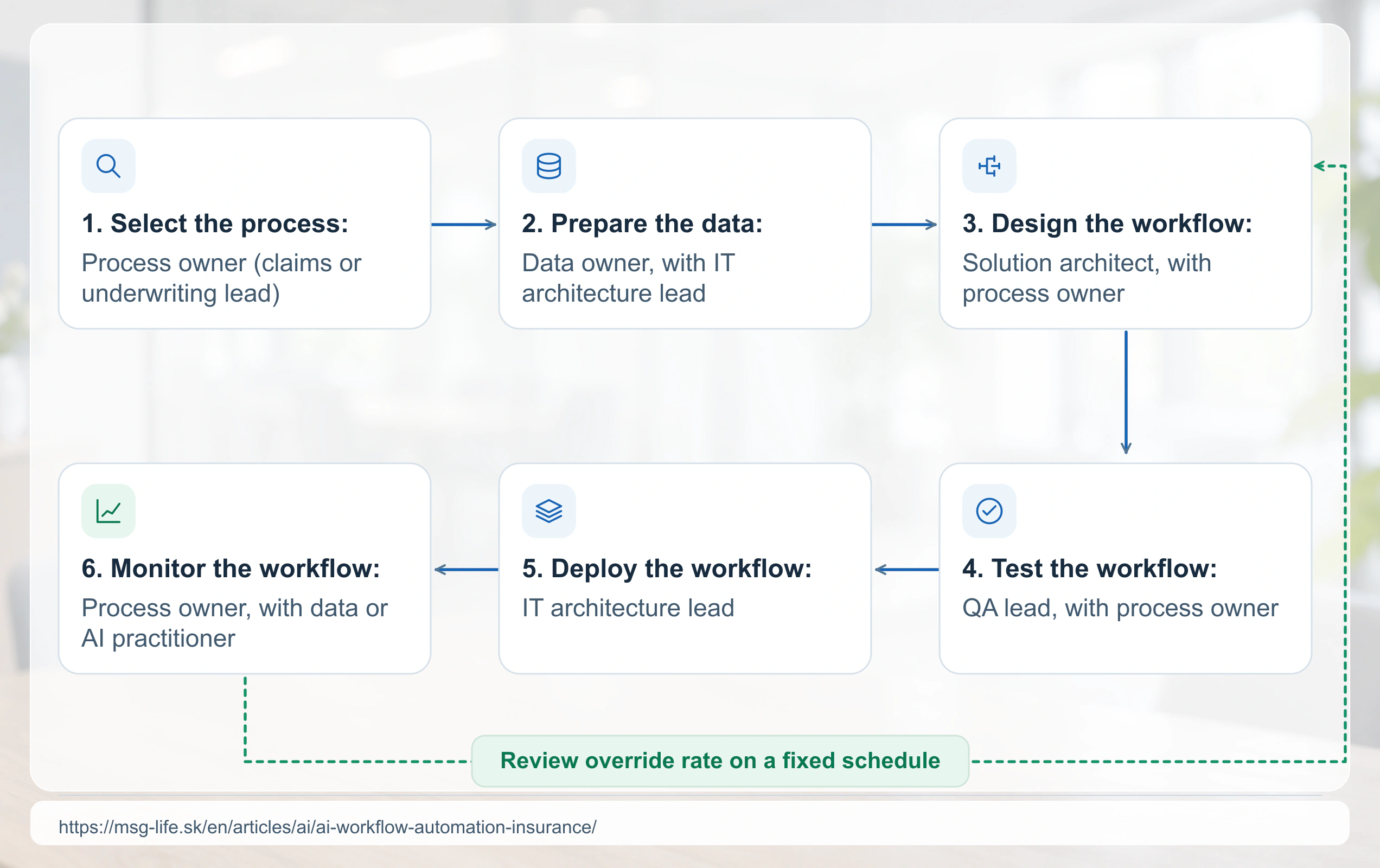
As an illustration, suppose monitoring shows that most overrides in an underwriting referral process happen on applications near one risk score threshold. Adjusting that threshold, and testing the change as in Step 4, may reduce override volume without retraining the underlying model. Deciding whether to adjust the threshold stays a process-level decision, not only a technical one.
Human-AI collaboration: What changes for insurance teams?
AI workflow automation does not remove people from insurance processes. It shifts their role from processing every case to reviewing exceptions and flagged decisions, and it changes daily work for claims handlers, underwriters, and service agents differently.
A claims handler who once reviewed every first notice of loss now reviews only the cases the system flags as complex or high-risk. That handler spends more time on judgment calls and less on routine payment approvals. An underwriter shifts from manually scoring every application to validating referral recommendations on the subset of cases the system escalates. A customer service agent handles fewer routine inquiries directly and takes on more complex, multi-step issues the system cannot resolve.
| Role | Before automation | After automation | Responsibility |
|---|---|---|---|
| Claims handler | Reviews every claim manually | Reviews flagged and high-value claims only | Claims operations lead |
| Underwriter | Scores every application manually | Validates referral recommendations on escalated cases | Underwriting lead |
| Customer service agent | Handles all inquiries directly | Handles escalated and complex inquiries | Customer service lead |
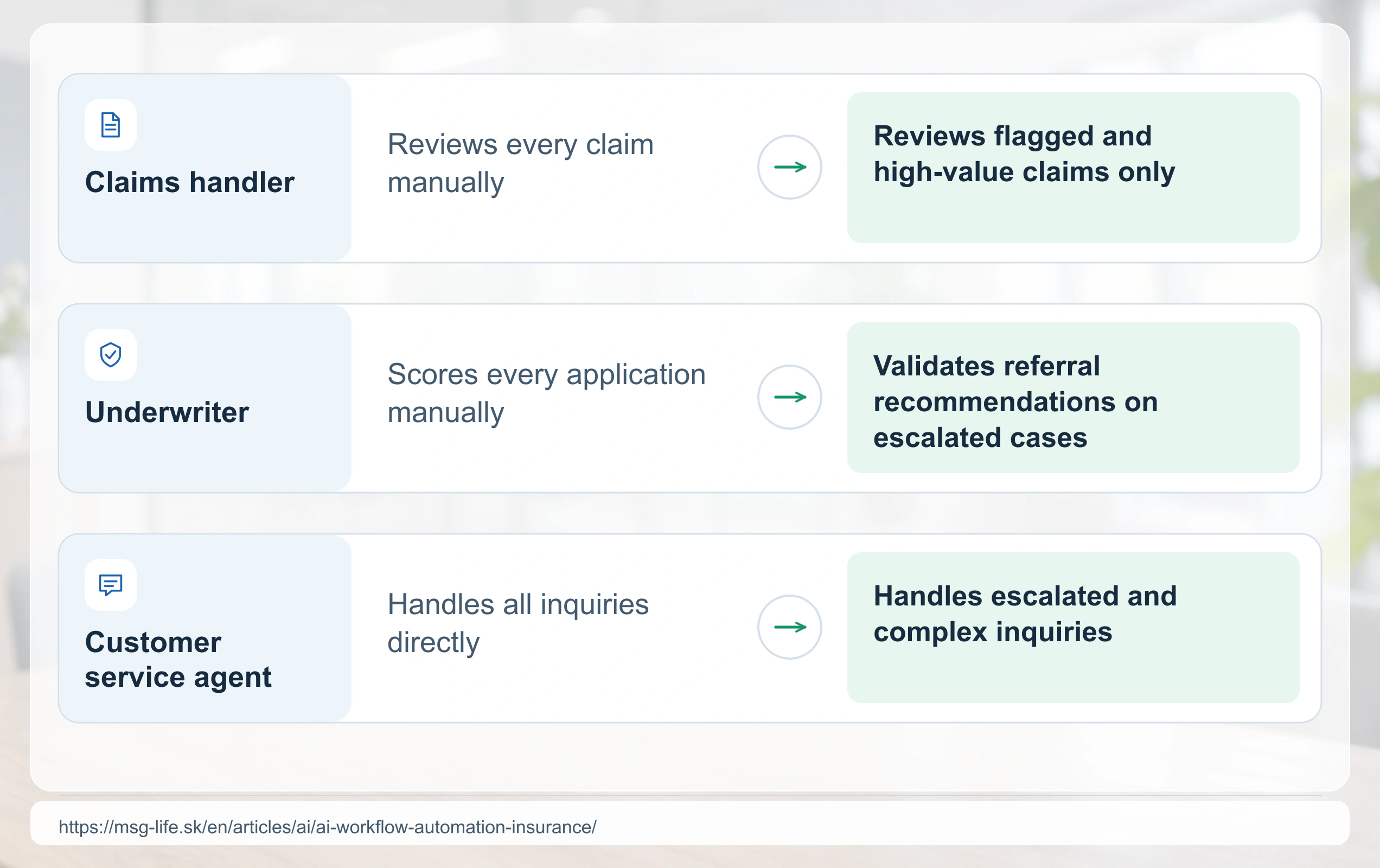
A central adoption challenge is trust. Staff need to see a system’s track record before they rely on its routing decisions in cases with real customer impact. Training that shows staff how to read an override log gives them a concrete way to check the system’s track record.
Compliance and regulatory considerations for AI workflow automation in insurance
AI workflow automation in insurance operates under existing insurance regulation and the EU AI Act: the Article 4 AI literacy duty applies to any AI system, and further obligations apply to specific uses. GDPR Article 22 applies where a decision on a customer’s claim or application is based solely on automated processing and produces legal effects for the customer or otherwise significantly affects them to a similar degree. Such a decision is permitted only on the grounds in Article 22(2). Where the decision is necessary to enter into or perform a contract with the customer, or is based on the customer’s explicit consent, the insurer must offer at least the right to obtain human intervention, to express a point of view, and to contest the decision (Article 22(3)). Decisions based on health data face stricter limits under Article 22(4).
Solvency II governance and data quality
EIOPA’s Opinion on AI governance and risk management clarifies how an insurer’s existing Solvency II system of governance and risk management applies to AI systems that are neither prohibited nor high-risk under the AI Act, without setting new requirements.
Where a workflow’s output feeds the calculation of technical provisions, Solvency II requires the data used to be appropriate, complete, and accurate, and Delegated Regulation (EU) 2015/35, Article 19, sets the criteria for each. This applies to data used in the calculation of technical provisions, which includes claims records that feed reserving, not to claims triage or customer service data in general.
DORA and ICT risk
DORA (Regulation (EU) 2022/2554), which applies from January 17, 2025, to most insurance and reinsurance undertakings (the smallest ones falling under Article 4 of Solvency II are excluded; Article 2(3)), governs the ICT systems an automated workflow runs on, including ICT risk management, incident management, resilience testing, and third-party ICT risk. It sets no AI-specific requirement on a model’s accuracy or drift; it covers the ICT risk-management framework a workflow’s infrastructure sits within.
EU AI Act classification
The actuarial and risk management functions, working with the business unit and counsel, should confirm whether a specific workflow falls under the EU AI Act’s high-risk category for risk assessment and pricing in relation to natural persons in life and health insurance (Annex III point 5(c)). Where it does, the obligations that follow apply from December 2, 2027. A system placed on the market or put into service before December 2, 2027, falls under them only if the system’s design changes significantly on or after that date. For an Annex I system, the equivalent date is August 2, 2028 (AI Act, Article 113, third paragraph, point (c), and Article 111(2) for systems already in service). For deployer monitoring, log retention, and fundamental rights impact assessments, see AI regulation for insurers.
Who signs off
Under Solvency II, the administrative, management, or supervisory body holds ultimate responsibility for compliance (Directive 2009/138/EC, Article 40), supported by the risk management and compliance functions; the IT team that builds the workflow does not carry that accountability. Documenting who signs off on a workflow’s design, testing, and monitoring gives supervisors and internal audit a clear chain of accountability.
Methodology scope: This guide addresses AI workflow automation for claims, underwriting, and customer service processes at insurance companies, from an IT and architecture leadership perspective.
What this does not address: This guide does not cover AI model development outside workflow automation, non-insurance industry use cases, or vendor-specific configuration steps. It does not provide a full article-by-article walkthrough of the EU AI Act.
Prerequisites: Readers should already understand their organization’s core insurance processes and have basic familiarity with IT and AI concepts, as set out in the Prerequisites section above.
Source: EIOPA, Opinion on AI governance and risk management; Directive 2009/138/EC (Solvency II), Article 82.
Limitations: What this guide does and does not cover
This guide has four scope boundaries a reader should confirm before applying it directly.
Model development is out of scope
This guide covers workflow design and orchestration. It does not cover how to build or train the underlying AI model; model architecture and training methodology belong in model-specific technical documentation.
Vendor-specific configuration is out of scope
The tool comparison above describes categories of platforms. It does not give step-by-step setup for any named vendor’s product, since configuration steps vary by vendor and change frequently.
Non-EU regulation is not covered in depth
The compliance section focuses on EU frameworks: Solvency II, DORA, the EU AI Act, and GDPR Article 22. An insurer operating outside the EU should confirm applicable local requirements separately.
Scale thresholds are not quantified
This guide does not state a specific claim or application volume above which automation becomes cost-effective. That threshold depends on an insurer’s existing staffing costs and system architecture, which vary too widely to generalize.